User roles reference
Parallel support for Legacy roles
Legacy user roles remain available to support a smooth transition until you’re ready. Legacy or new user roles can be provided on a user-to-user basis, so you can be flexible for what works for your teams. A user cannot hold both legacy and new roles simultaneously; the UI will guide them to switch between the two. For users who remain on legacy roles, they’ll continue to use the existing permission structure, while new roles use the expanded Read Only → Standard → Admin model.
For customers running a version before 25.4.2, please see legacy roles and permissions below for more information.
Overview
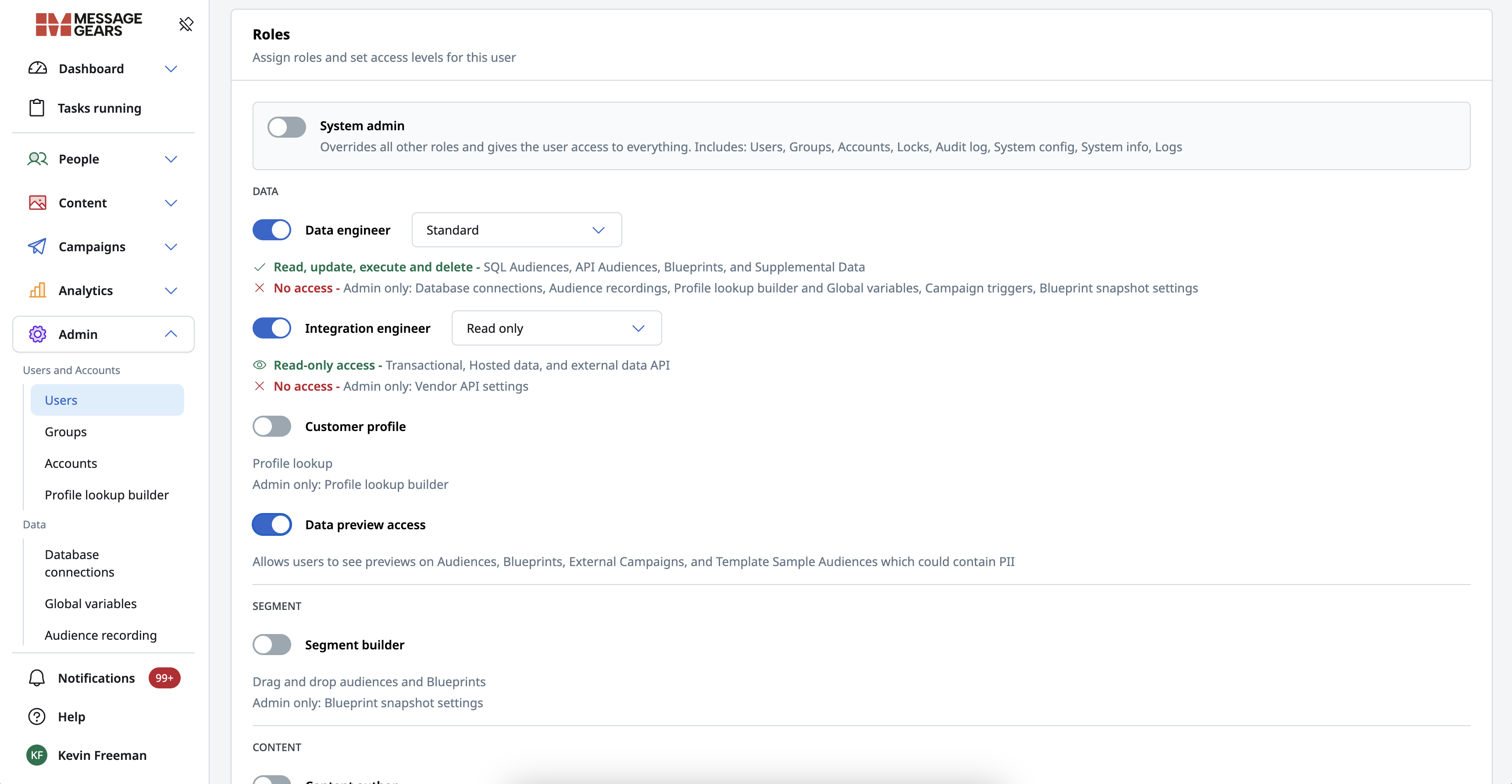
Assign roles and set access levels for each user. The permissions system uses expanded user roles (Data Engineer, Segment Builder, Content Author, Campaign Author, Reporting Analyst, and more) with Read only, Standard, and Admin levels where applicable. These roles define page-level access and allowed actions (view, edit, execute, delete) within each area of the application.
Read Only permission tier
Users assigned Read Only variants of a role can access relevant pages, but cannot create, save, edit, or execute actions. Pages visually display disabled actions rather than removing them entirely, providing clarity on available functionality. Read Only behavior has been added to pages which previously had no permissions model, such as Hosted data, External data API, and Supplemental data, ensuring consistent access control.
Standard permission tier
Users assigned Standard variants of a role can access relevant pages, as well as create, save, edit, or execute within those assets.
Admin permission tier
Users assigned Admin variants of a role can access relevant pages, perform all actions on them, and have access to certain Setup pages that are relevant to the role’s areas. For example, the Campaign author Admin tier will allow a user access to the Sending Profile setup page. Note that not all roles have relevant Admin- or setup-related pages, and thus do not offer an Admin tier of the user role.
If Brands is enabled, the Brand association will supersede User Role unless the user has System Admin. For example, even if the user has the Content Author - Admin role, they won’t see templates associated to Brands they don’t have access to.
Roles
System admin
Overrides all other roles and gives the user access to everything.
Includes: Users, Groups, Accounts, Locks, Audit log, System config, System info, Logs
Data roles
Data engineer
| Level | Access |
|---|---|
| Read only | 👁 Read-only access: SQL Audiences, API Audiences, Blueprints, and Supplemental Data. ❌ No access to Admin-only: Database connections, Audience recordings, Profile lookup builder, Global variables, Campaign triggers, Blueprint snapshot settings. |
| Standard | ✅ Read, update, execute, and delete: SQL Audiences, API Audiences, Blueprints, and Supplemental Data. ❌ No access to Admin-only: Database connections, Audience recordings, Profile lookup builder, Global variables, Campaign triggers, Blueprint snapshot settings. |
| Admin | ✅ Read, update, execute, and delete: SQL Audiences, API Audiences, Blueprints, and Supplemental Data ✅ Read, update, execute, and delete to Admin only: Database connections, Audience recordings, Profile lookup builder, Global variables, Campaign triggers, Blueprint snapshot settings |
Integration engineer
| Level | Access |
|---|---|
| Read only | 👁 Read-only access: Transactional, Hosted data, and External data API. ❌ No access to Admin-only: Vendor API settings. |
| Standard | ✅ Read, update, execute, and delete: Transactional, Hosted data, and External data API. ❌ No access to Admin-only: Vendor API settings. |
| Admin | ✅ Read, update, execute, and delete: Transactional, Hosted data, and External data API ✅ Read, update, execute, and delete to Admin only: Vendor API settings |
Customer profile
| Level | Access |
|---|---|
| Standard | ✅ Read, update, execute, and delete: Profile lookup. ❌ No access to Admin-only: Profile lookup builder. |
| Admin | ✅ Read, update, execute, and delete: Profile lookup ✅ Read, update, execute, and delete to Admin only: Profile lookup builder |
Data preview access
Allows users to see previews on Audiences, Blueprints, External Campaigns, and Template Sample Audiences, which could contain PII (personally identifiable information).
Segmentation roles
Segment builder
| Level | Access |
|---|---|
| Read only | 👁 Read-only access: Drag and drop audiences and Blueprints. ❌ No access to Admin-only: Blueprint snapshot settings. |
| Standard | ✅ Read, update, execute, and delete: Drag and drop audiences and Blueprints. ❌ No access to Admin-only: Blueprint snapshot settings. |
| Admin | ✅ Read, update, execute, and delete: Drag and drop audiences and Blueprints ✅ Read, update, execute, and delete to Admin only: Blueprint snapshot settings |
Content roles
Content author
| Level | Access |
|---|---|
| Read only | 👁 Read-only access: Templates. ❌ No access to Admin-only: System config email editor settings. |
| Standard | ✅ Read, update, execute, and delete: Templates. ❌ No access to Admin-only: System config email editor settings. |
| Admin | ✅ Read, update, execute, and delete: Templates ✅ Read, update, execute, and delete to Admin only: System config email editor settings |
Global content author
| Level | Access |
|---|---|
| Read only | 👁 Read-only access: Global snippets |
| Standard | ✅ Read, update, execute, and delete: Global snippets |
Journey roles
:::Version Notice Journey roles are available starting Accelerator 26.2.3 release behind a feature flag. Contact your Customer Success Manager (CSM) for more information. :::
Journey builder
| Level | Access |
|---|---|
| Read only | 👁 Read-only access: Journey campaigns. ❌ No access to Admin-only: Journey settings and configuration. |
| Standard | ✅ Read, update, execute, and delete: Create and manage journey campaigns. ❌ No access to Admin-only: Journey settings and configuration. |
| Admin | ✅ Read, update, execute, and delete: Create and manage journey campaigns ✅ Read, update, execute, and delete to Journey settings and configuration |
Campaign roles
Campaign author
| Level | Access |
|---|---|
| Read only | 👁 Read-only access: Marketing campaigns, Experiments, Transactional, and Orchestration. ❌ No access to Admin-only: Sending profiles. |
| Standard | ✅ Read, update, execute, and delete: Marketing campaigns, Experiments, Transactional, and Orchestration. ❌ No access to Admin-only: Sending profiles. |
| Admin | ✅ Read, update, execute, and delete: Marketing campaigns, Experiments, Transactional, and Orchestration ✅ Read, update, execute, and delete to Admin only: Sending profiles |
External campaign author
| Level | Access |
|---|---|
| Read only | 👁 Read-only access: External campaigns. ❌ No access to Admin-only: System config External destinations. |
| Standard | ✅ Read, update, execute, and delete: External campaigns. ❌ No access to Admin-only: System config External destinations. |
| Admin | ✅ Read, update, execute, and delete: External campaigns ✅ Read, update, execute, and delete to Admin only: System config External destinations |
Analytics roles
Reporting analyst
Provides the user with access to Account analytics, Campaign analytics, and Jobs
Cloud
Cloud access
This is a specialized role! Provides the user with access to the Cloud Admin application UI using the same credentials. This role has no function within the Accelerator application.
Please reach out to your CSM regarding any specific questions regarding this role.
Role mapping
Use the Area column to scan by topic. For how each legacy role maps to new roles, see User Application Roles below.
| Area | New role | Maps from | Notes |
|---|---|---|---|
| System admin | System Admin | System Admin | Full-access model unchanged. System Admin users are not required to migrate. |
| Data roles | Data Engineer | Data Admin | Previously required Admin privileges to avoid usability gaps with SQL/API data access. Now cleanly tiered. |
| Data roles | Integration Engineer | Campaign Admin Data Admin | Transactional/API access was split across Campaign Admin and Data Admin. Integration Engineer consolidates all technical integration surfaces into one role. |
| Data roles | Customer Profile | Data Admin | Narrow role for support/ops users who need customer lookup without full data engineering access. |
| Data roles | Data Preview Access | Data Preview Access | Retained as-is. No tier structure applied. |
| Segment roles | Segment Builder | Data Admin Campaign Admin | DnD audience building from Data Admin; Blueprint canvas segmentation from Campaign Admin. Consolidates both into a dedicated role, separate from SQL/API engineering. |
| Content roles | Content Author | Template Admin | Direct successor to Template Admin. Email Editor settings previously required a separate Admin-level grant; now self-contained in the Admin tier. |
| Content roles | Global Content Author | Template Library Author | Replaces the former Template Library Author role. Not derived from Template Admin, which covered the full template editing surface. |
| Campaign roles | Campaign Author | Campaign Admin Campaign User | Campaign Admin had broad access; Campaign User was more restricted. The new role collapses both using Read Only → Standard → Admin tiers. Quick Launch User was also merged into this role, but to fully replicate Quick Launch User behavior a user needs both Campaign Author and Content Author. |
| Campaign roles | External Campaign Author | Campaign Admin | External campaigns were bundled inside Campaign Admin. Now a dedicated role for teams who exclusively manage external/destination-based sends. |
| Analytics roles | Reporting Analyst | Campaign Admin | Not a 1:1 replacement — no dedicated Report Admin role existed previously. Analytics access was bundled within Campaign Admin. This is a net-new dedicated role. |
| Cloud roles | Cloud Access | Cloud Access | Specialized role carried forward unchanged. |
Legacy roles and permissions
Roles and permissions for releases before 25.4.2
Definitions
Assets are any permission-based object where activity can be tracked and audited. Folders, templates, campaigns, and shared content are considered Assets. Each one of those items can have different permissions applied to it, which allows administrators to control which users or groups of users should have different levels of access.
Application Roles are applied at the User level, and define the general level of access for an individual User in Accelerator. A User's Roles will affect the visibility of icons in the top navigation bar while logged into Accelerator as that User.
Users will only have the maximum level of access granted by their Role. For example, a User may be in a Group with Execute Permission on Campaigns, but if the User does not have the Campaign Admin Role, they will not be able to access any Campaigns.
Permissions are applied at the Application Group level, and can vary from Asset to Asset within Accelerator.
User Application Roles
| The role of... | Allows the user to... | New role(s) (25.4.2+) |
|---|---|---|
| Data Administrator | access recipient lists and administer Audience sections, i.e. database connections | Data Engineer Segment Builder Customer Profile |
| Template Author | create and manage messaging templates | Content Author |
| System Admin | access the Admin menu in Accelerator to manage users, groups, accounts, and sending profiles | System Admin (retained, no change) |
| Campaign Admin | schedule or launch campaigns | Campaign Author External Campaign Author Integration Engineer Segment Builder Reporting Analyst |
| Campaign User | more restricted campaign access than Campaign Admin | Campaign Author (Read Only / Standard tiers) |
| Accelerator User | provides base access to your local Accelerator application UI | — |
| Data Preview Access (released 25.1.1) | allows users to see recipient data previews on Audience, Blueprint, Template, and Campaign sample audiences. Previews may display recipient PII. | Data Preview Access (retained, no change) |
| Template Library Author (formerly Global/Shared Content Author) | manage content assets in Global Snippets used across multiple templates and campaigns | Global Content Author |
| Quick Launch User | launch campaigns from the content/template section | Campaign Author + Content Author (both required to fully replicate) |
| Cloud Access | track and manage bulk and transactional jobs in the cloud using MessageGears Portal | Cloud Access (retained, no change) |
Asset Permission Levels for Groups
| Permission Type | Users within the Group CAN... |
|---|---|
| Read | View the asset |
| Update | Edit or move the asset |
| Delete | Remove the asset from Accelerator |
| Execute | Content: - Quick Launch Use the following testing functions: - Spam Filter - Content Evaluation - Email Clients - Subject Line Campaigns: Marketing Campaigns - Send Test - Launch campaign - Schedule sends - Use Spam Filter testing - Use (A/B) Experiments (formerly Multivariate) Transactional Campaigns - Send Test - Promote campaign - Use Spam Filter testing |