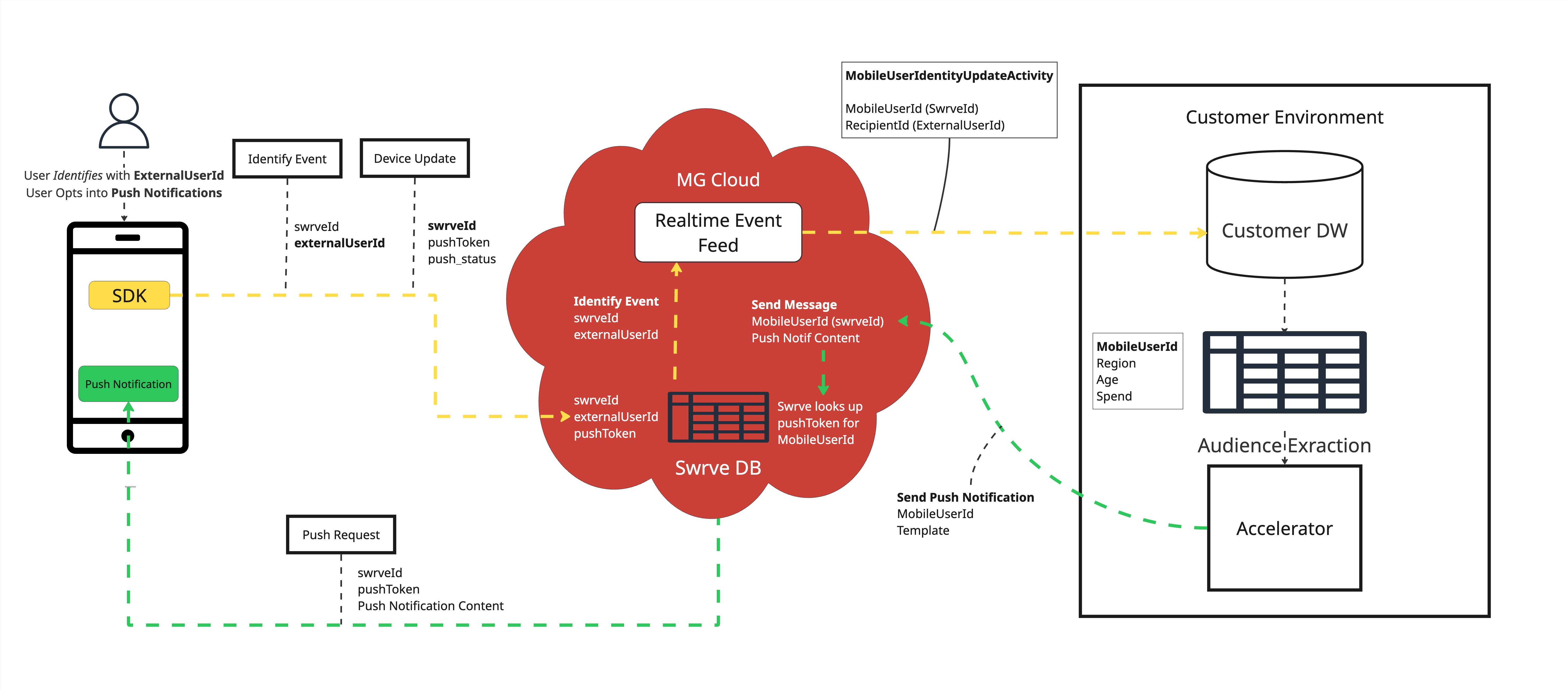
User identifiers across Accelerator and mobile SDK (Swrve)
Overview
This article describes how user identifiers are represented, mapped, and used between MessageGears Accelerator (MG) and our Mobile SDK (Swrve). It explains the relationships between the different identifiers, how they are stored and shared, and what is required to build audiences for campaigns targeting Push, In-App, or Embedded channels.
For more details on how the Mobile SDK creates and tracks user IDs, see Tracking your users with Swrve User Identity.
Key Takeaways
- ID Mapping:
externalUserId(Mobile SDK) =RecipientId(MG). - Event Feed: The data warehouse will not know
MobileUserIdwithout consuming Mobile User Identity events. - Audience Requirement: All audiences for Push/In-App/Embedded campaigns must contain
MobileUserId. - Solution: Join Identity events to customer data and persist a mapping table in the data warehouse.
Requirements
Platform prerequisites
- MessageGears Accelerator for message activation
- Mobile SDK (Swrve) integration in your mobile app or website
- Real-Time Event Feed configured for consuming identity events into your data warehouse
Data prerequisites
To target users with Push, In-App, or Embedded campaigns, your audience must include the MobileUserId column. This requires:
- A customer unique ID in your data warehouse
- Consuming MobileUserIdentityUpdateActivity events from the Real-Time Event Feed API
- Creating a mapping table in your data warehouse that joins RecipientId to externalUserId
- Leverage this mapping through a centralized table, view, or audience queries to send messaging through mobile channels from the MessageGears UI
Identifier Types
MessageGears Identifiers
RecipientId- Definition: A channel-agnostic unique user identifier sourced from the customer’s data warehouse (DW).
- Purpose: Represents a known user (e.g., customer ID, account ID, profile ID) and should be included in all messaging campaigns and data warehouse extractions.
- Mapping: 1:1 relationship with externalUserId
- Availability in Accelerator: Sourced from and always known to the customer data warehouse.
MobileUserId- Definition: The SDK-generated anonymous identifier (swrveId) created when a user first launches the app or visits the website.
- Purpose: Required identifier for messaging SDK channels from the MessageGears UI
- Mapping: 1:1 relationship with the swrveId in Mobile dashboard
- Availability in Accelerator: After consuming MobileUserIdentityUpdateActivity events from Real-Time Event Feed into data warehouse, then mapped to RecipientId via externalUserId
Mobile SDK (Swrve) Identifiers
swrveId- Definition: Anonymous identifier generated by the Mobile SDK upon the first app/website launch.
- Purpose: Acts as an anonymous identifier until authentication occurs
- Mapping: Equal to the MobileUserId in the MessageGears UI once ingested into the customer data warehouse
- Availability in Swrve: Immediately in Swrve upon the first app/website launch
externalUserId- Definition: Persistent ID set by the app when the user authenticates
- Purpose: Represents the persistent user identity across sessions/devices on the SDK side
- Mapping: Equal to the RecipientId in the MessageGears UI
- Availability in Swrve: Once the user identifies in the app or website
Identifier mapping
| Concept | MessageGears Name | Mobile SDK Name | Notes |
|---|---|---|---|
| Known User ID | RecipientId | externalUserId | Known user identifier in DW and set via SDK. |
| Anonymous User ID | MobileUserId | swrveId | swrveId is generated by SDK |
| Mapped Identity | RecipientId ↔ externalUserId | MobileUserId ↔ swrveId | Mapping requires identity events. |
Event & Data Exchange
- Real-Time Events:
- Swrve sends identity updates to the MessageGears Cloud
- Customers can consume these via the Real-Time Event Feed API.
- Relevant type: MobileUserIdentityUpdateActivity.
Audience Requirements for Push, In-App, and Embedded
- Any campaign using these channels must include
MobileUserIdin its audience. - Since existing audiences may only have
RecipientId, customers must create a mapping toMobileUserIdif it is not already joined into audience data through a customer profile table, view, or within audience queries.
Steps to Populate MobileUserId in the Data Warehouse
- Consume MobileUserIdentityUpdateActivity events from the Real-Time Event Feed.
- Join on RecipientId from the data warehouse to RecipientId in the event payload.
- Extract and store MobileUserId in a dedicated data warehouse table.
- Join the MobileUserId into customer data for activation, either through a centralized customer profile table, view, or within audience queries directly.For example, if integrated as part of the customer profile table/view:
SELECT
    RecipientId,
    MobileUserId,
    EmailAddress,
    FirstName,
    ...
FROM customer_profile c
-- optionally filter consent using your specific column/value
WHERE MobileOptInStatus = 'active'
or if needing to join through a mapping table:
SELECT
    u.RecipientId,
    m.MobileUserId,
    u.EmailAddress,
    u.FirstName,
    ...
FROM customer c
JOIN your_mobile_user_mapping m ON c.RecipientId = m.RecipientId
-- optionally filter consent using your specific column/value
WHERE c.MobileOptInStatus = 'active'
Process Diagram
Below is the flow from the Data Warehouse and Real-Time Event Feed to a campaign-ready audience: