Accelerator 26.3.1 release notes
Initiatives released
Push to Inbox
This release adds Inbox messaging as a new native channel in the UI. Because Inbox messages persist, recipients can still view them even if a notification was missed, dismissed, or cleared, reducing how much reach depends on push opt-in. Inbox messages will be delivered into an existing inbox or message center within your app configured with the MessageGears SDK.
Use case
- Transactional updates — Deliver order confirmations and payment alerts directly to the app inbox, where they persist for the recipient to review later.
- Batch marketing offers — Give promotions and offers higher visibility by placing them in a persistent surface instead of a dismissible notification.
- Re-engagement — Reach recipients who missed or dismissed a push notification, or who haven't opted-in to push notifications at all.
Goals
- Give marketers a persistent, in-app message surface that doesn't depend on push opt-in for reach.
- Let marketers create Inbox content natively in Templates.
- Support Inbox across marketing and transactional campaigns.
Capabilities
- New Inbox content type under push templates.
- Copy from Push carries push field values into the Inbox template, including advanced key/value pairs.
- Preview panel toggles between a sample UI rendering (for marketers) and the JSON payload sent to the SDK (for developers).
- Dedicated Inbox QA devices for sending test Inbox messages, listed separately from push QA devices.
- Inbox channel filters and a new Inbox icon on list pages.
- Send Inbox as a single-channel push campaign, or as part of a multi-channel campaign.
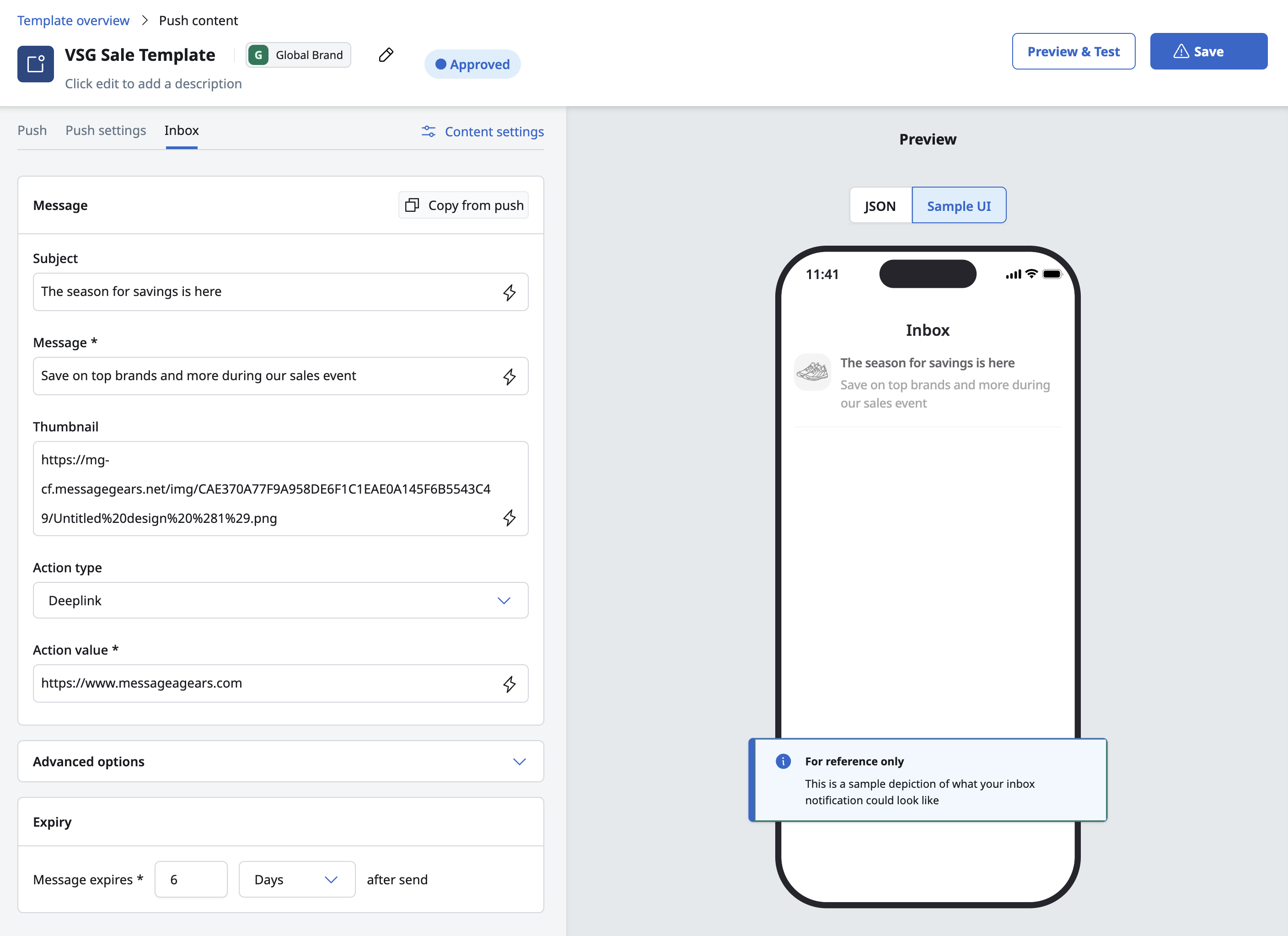
See Push to Inbox content for more details.
Predictive models in the UI
This release surfaces predictive model scores directly in the Blueprint, campaign, and journey UI, both to route each recipient to their optimal channel automatically, and to more easily segment audiences on model outputs through a dedicated selection tab.
Use case
- Multi-channel campaigns — Reach each recipient on the channel the model scores as most likely to engage them, instead of applying a single channel choice to the whole audience.
- Journey orchestration — Apply the same per-recipient channel selection inside a Multi-channel node in a journey.
- Retention campaigns — Target recipients above a churn-risk threshold with a win-back offer.
- Value-based segmentation — Split an audience by model scores like purchase propensity and engagement index to tailor messaging.
Goals
- Let marketers apply the existing Optimal Channel model directly when configuring a campaign or journey.
- Give marketers better visibility into audience coverage before they launch.
- Ensure every recipient receives a message, even without a channel score.
- Let marketers segment on predictive model scores directly in Blueprints and Journeys, the same way they'd segment on any other audience column.
Capabilities
Segmentation
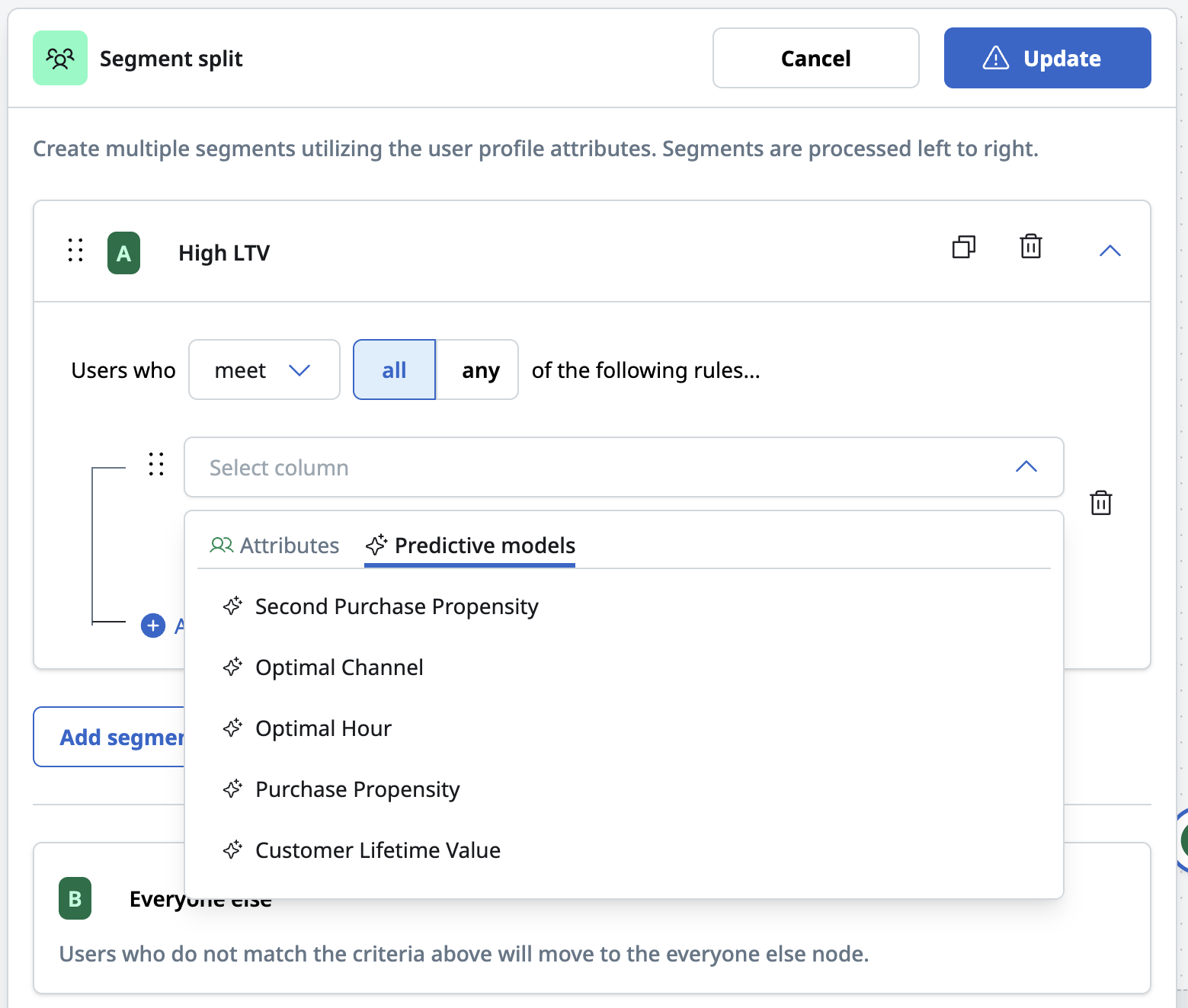
- Seven models available as segmentation criteria in Blueprint nodes and journeys segment tiles: churn, purchase propensity, second purchase propensity, customer lifetime value (LTV), engagement index, optimal channel, and optimal hour.
- The segment column picker separates general attributes from predictive models; apply operators and thresholds as with any other segment condition.
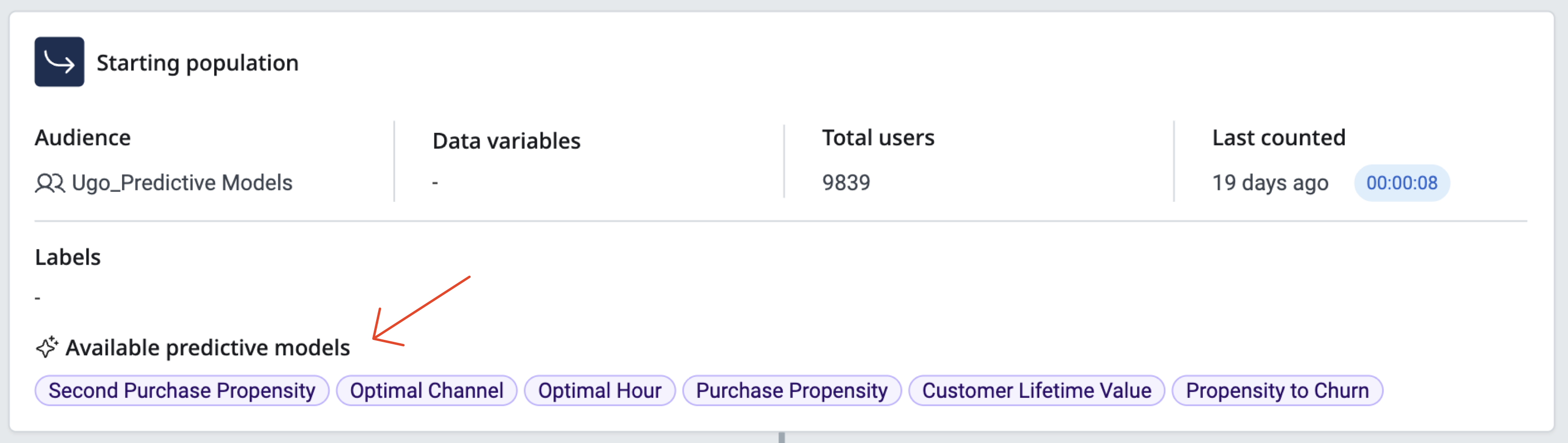
- Visual model indicators across blueprints, campaigns, and journeys with avalable model names in
- Blueprint nodes and journey tiles using a model display a model indicator icon, visually distinct from, but positioned similarly to, the AI summaries icon.
- Predictive model columns are highlighted and grouped together in audience, Blueprint, and User Profile sample previews.
Optimal Channel (messaging)
- Select Optimal Channel as a channel option in a Marketing Campaign or Journey when two or more channels are selected, with a model indicator on the campaign overview page and launch confirmation.
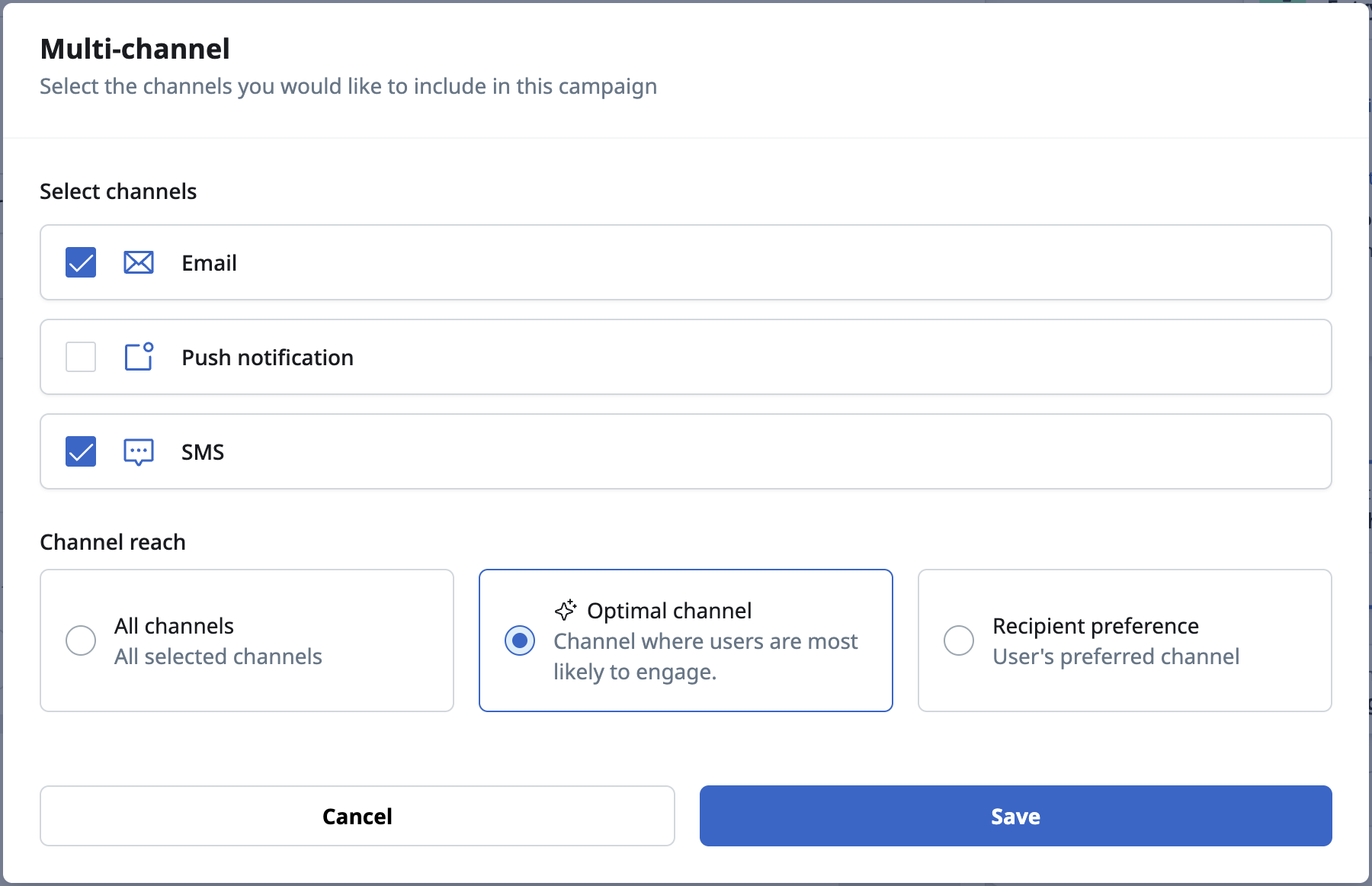
- A visual breakdown displays how many contacts in the audience or user profile have an Optimal Channel value, and the distribution across channels.
- Validates when the selected audience or user profile lacks an Optimal Channel column, and falls back to sending across all selected channels.
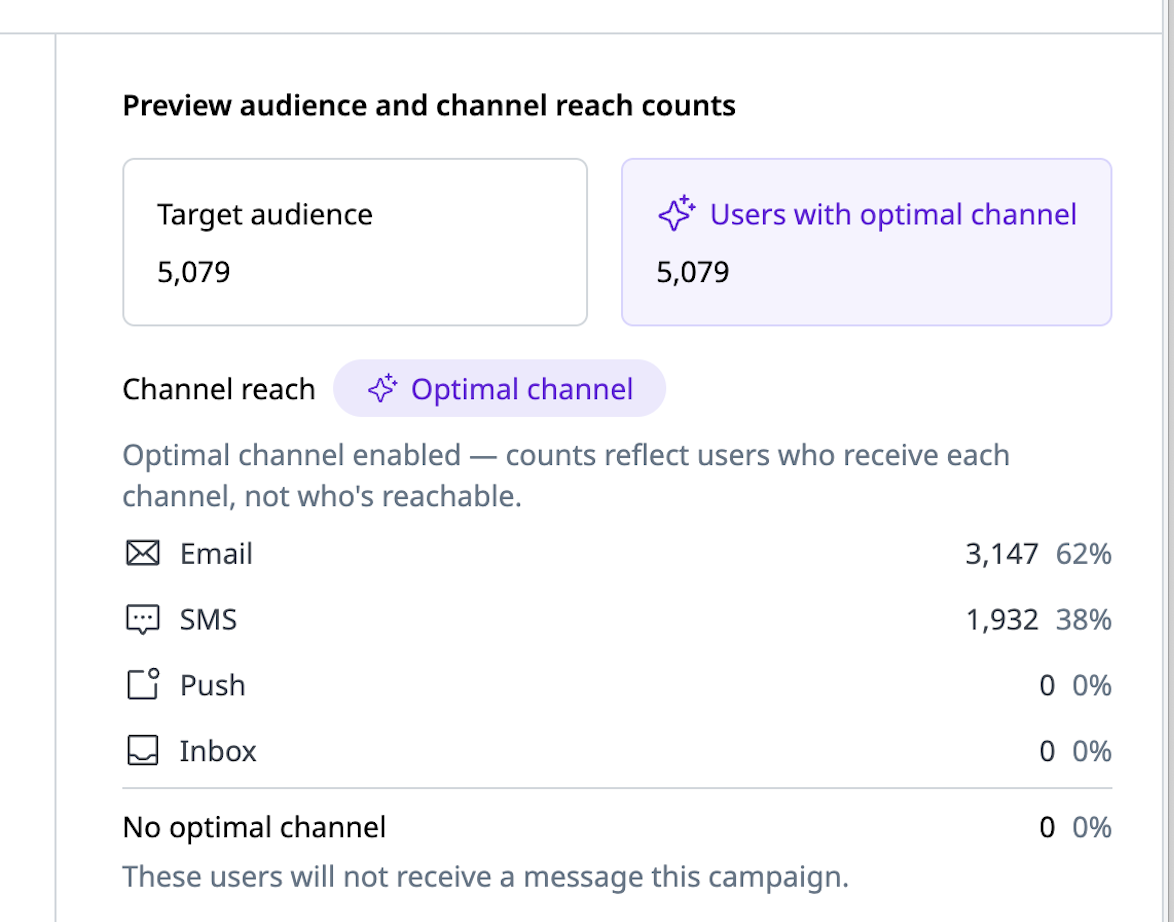
See Using predictive models in campaigns and journeys and Reserved predictive model column names for more details.
Push opt-in and channel reach
Push counts have always been based on whether a contact has a MobileUserID, which only indicates whether a user has the app installed. This release surfaces the device-level opt-in permission that push delivery actually depends on, giving marketers a realistic view of campaign reach prior to launch.
Use case
- Campaign forecasting — See the realistic reach of a push campaign at setup time, so expected volumes line up with job and campaign analytics after the send.
- Platform planning — Compare opt-in strength across iOS, Android, and Web to decide where to focus push investment and where to run opt-in prompts.
- Implementation validation — Confirm the mobile SDK and event feed are wired up as expected, since opt-in counts of zero on every platform point to a setup issue.
Goals
- Give marketers per-platform visibility into push opt-in before they launch a mobile campaign.
- Bring expected campaign reach in line with the delivery numbers reported in job and campaign analytics.
- Keep push behaving exactly as it does today for customers who have not yet populated the new opt-in fields.
Capabilities
- Channel Reach is now its own line item rather than something surfaced only on hover, making per-channel reach visible directly in the Who card and Who modal.
- Known Opt-Ins are shown alongside the existing push count: the number of contacts with a MobileUserID who have explicitly opted in on at least one targeted platform, plus the percentage of the push audience that represents.
- A per-platform breakdown for iOS, Android, and Web, each with its own opt-in count and percentage of the total push count.
- Marketing Campaigns show only the platforms the campaign targets — target Android alone, and only the Android opt-in count appears.
- A platform with no opt-in column present in the audience is clearly marked Not configured, so marketers can tell configured platforms apart from genuinely low opt-in.
- In-product help text explains how Known Opt-Ins and the push count are each calculated, wherever they appear.
- Available in SQL audiences and Marketing Campaigns.
Known Opt-In counts are driven by three optional reserved columns being returned by the audience: iOSPushOptIn, AndroidPushOptIn, and WebPushOptIn. Customers populate these from the real-time event feed device updates. The columns are entirely optional and fully backwards compatible — push counts and push delivery behave exactly as they do today with or without them.
Known Opt-In counts are for visibility only — they do not filter the send. A push campaign still delivers to every contact with a Mobile User ID, regardless of opt-in status. Automatic filtering of known opted-out contacts is planned for a future release. Known Opt-In counts are not yet available in Journeys.
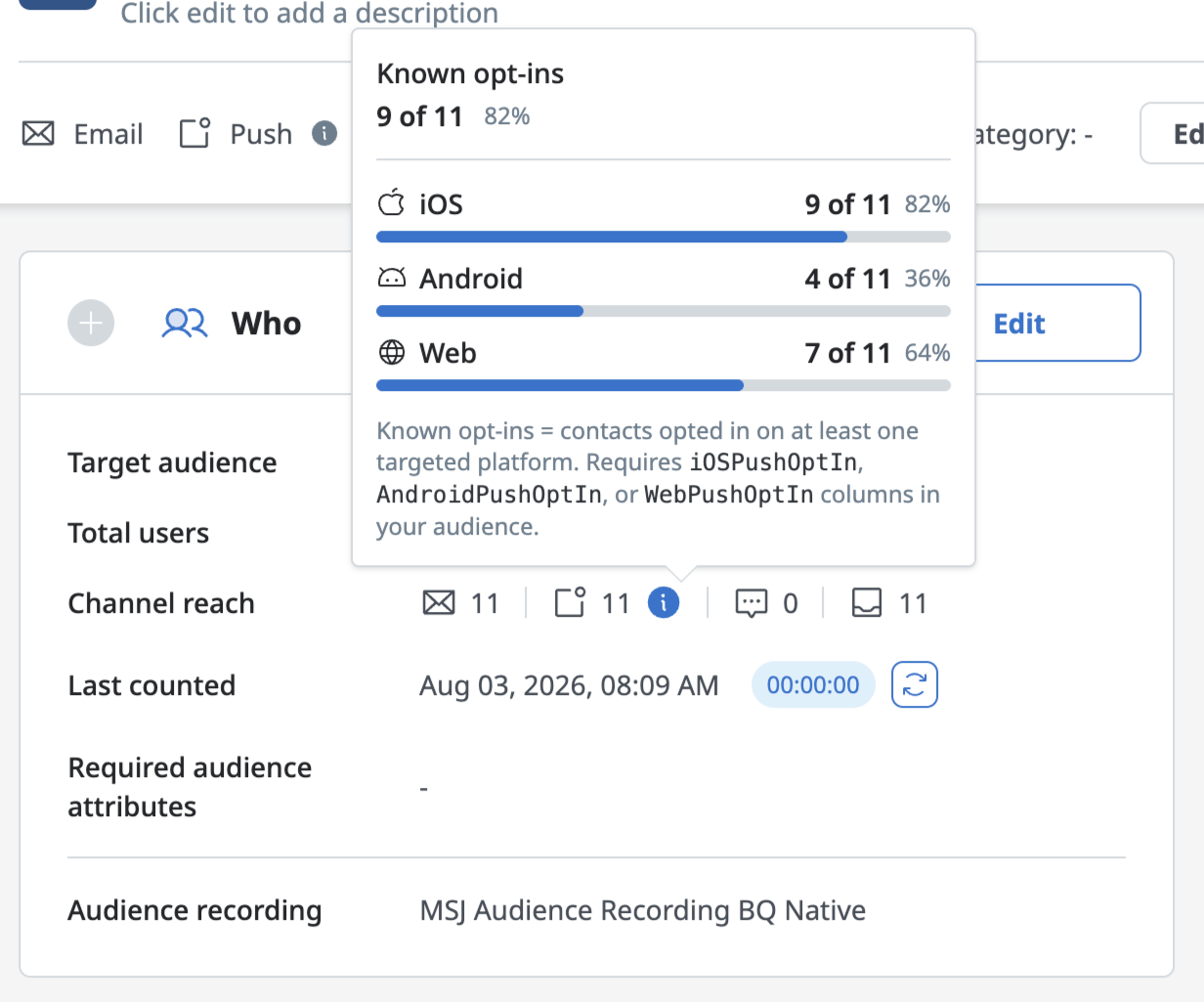
See Push opt-in and channel reach metrics.
New audience types for In-app message and Embedded campaigns
In-app message and Embedded campaigns build their audience from a data warehouse query and sync, which means the mobile moments that matter most — a user's very first session, or an app-wide announcement — can now be targeted in real time instead of waiting on that pipeline.
Use case
- Onboarding — Welcome and orient a user during their first app session, while they are still in the app.
- Feature education and permission prompts — Introduce a new feature or ask for push permission at the moment a new user is most engaged.
- App-wide announcements — Broadcast a service notice or an "update your app" message to the entire app population without running an audience query.
Goals
- Let marketers reach mobile users at real-time moments, first session and immediate app-wide reach, without waiting on an audience query and extract.
- Make first-session and same-session targeting simple to configure, demonstrate, and launch.
Capabilities
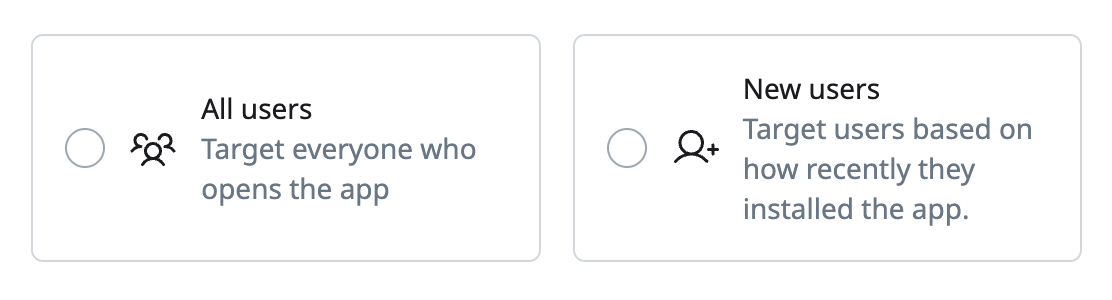
- Two new audience types for In-app message and Embedded campaigns: All users and New users.
- All users makes every user who opens the app eligible to trigger the campaign.
- New users targets users within a configurable number of days of their first app open following a new install, one day being the typical onboarding case.
- The Marketing Campaigns list page shows All users or New users as the audience for these campaigns, so the targeting approach is visible at a glance.
Because these audience types target users in real time rather than running an audience query, audience recording, pre- and post-campaign triggers, and data variables are not applicable, and the total users count shows N/A by design, the same pattern already used for the push notification audience type. In-app message and Embedded campaign analytics populate as usual once the campaign is live.
General changes
List of defects remediated or small enhancements included in this release:
Enhancements
- The Column Customization panel on External Campaigns now scrolls horizontally within the panel itself, instead of requiring a scrollbar below the preview section.
- External Campaign settings now display the vendor's field title (the human-readable label) instead of the internal field name on destination field chips.
- Real-time event feed events for a WebPush permission change (granted to denied, or denied to granted) now better distinguish which platform the change occurred on.
- External Campaigns now support a Swrve real-time user property destination, allowing customers to map audience attributes directly to the real-time user properties configured for the audience's mobile app. This update streamlines in-app message personalization.
- Push notification send requests that are automatically suppressed due to lack of push token or permission are now tracked as suppressions instead of bounces.
- Vibes and Voodoo added as SMS vendors.
Fixes
- Resolved an issue where default destination field mappings on an External Campaign weren't being persisted.
- Resolved an issue where certain conditions caused bounces to be double-counted in campaign analytics.