Push opt-in and channel reach metrics
Channel Reach shows how many contacts in a push audience have actually granted consent to receive push notifications, not just how many have the app installed. Use this article to understand what Known Opt-Ins and the per-platform opt-in breakdown mean, how they're calculated, and how to read the results before you launch a push send.
Channel Reach and Known Opt-Ins are available starting in Accelerator version 26.3.1.
This article covers how to interpret opt-in and reach metrics for a push audience that's already configured. To add the reserved opt-in columns to an audience, see Creating and editing audiences.
View channel reach and opt-in metrics
-
Open a SQL audience or a Marketing Campaign that targets the push channel.
-
Click the Who card, or expand the Who modal for the full breakdown.
-
Look for the Channel Reach section. It shows Known Opt-Ins alongside the existing push count, followed by a per-platform breakdown for iOS, Android, and Web. In-product help text next to each figure explains how it's calculated.
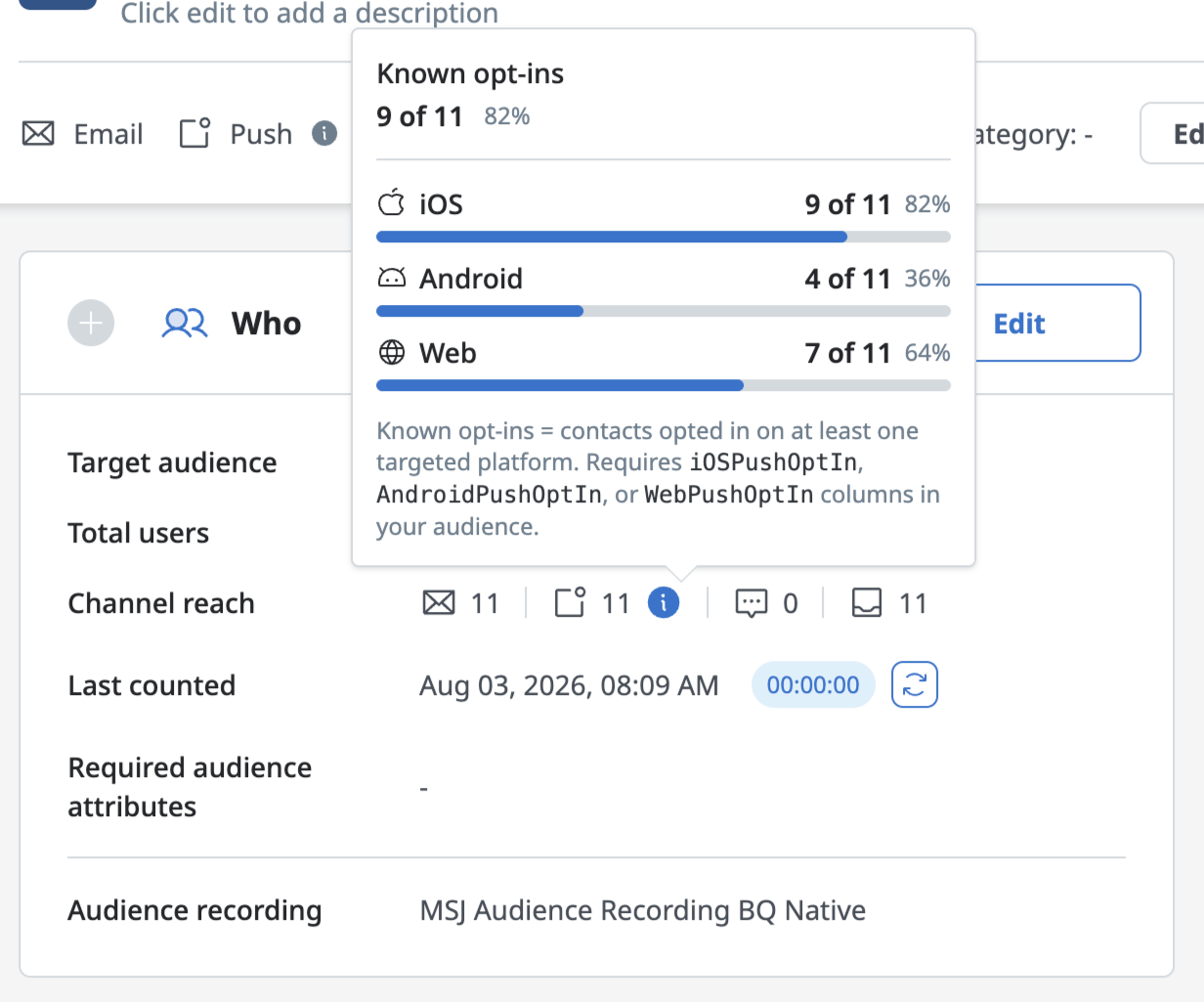
The Who card/modal showing the Channel Reach section with Known Opt-Ins and the per-platform iOS/Android/Web breakdown
Metrics
| Metric | What it measures | Notes |
|---|---|---|
| Push count | The number of contacts targeted by the campaign who have a MobileUserId, meaning the mobile app has been installed and identifiable. | This is the existing metric push delivery has always been based on. It does not indicate whether the contact has granted the OS-level push permission. |
| Known Opt-Ins | The number of contacts with a MobileUserId who have explicitly opted-in to push on at least one targeted platform, plus the percentage of the push count that represents. | Calculated from the iOSPushOptIn, AndroidPushOptIn, and WebPushOptIn reserved columns, populated from device-level permission events in the Real-Time Event Feed. A column only counts as opted-in when it evaluates to boolean TRUE or 1; a column that's present but FALSE, 0, or null does not count toward Known Opt-Ins, even though the contact still counts toward the Push count. |
| Per-platform opt-in (iOS, Android, Web) | The opt-in count and percentage of the total push count for each individual platform. | In a Marketing Campaign, only the platforms the campaign actually targets are shown — targeting Android alone shows only the Android opt-in figure. SQL audiences have no platform-targeting concept, so every platform with a reserved column present in the query is shown. |
| Not configured | A platform state shown in place of a count or percentage. | Appears when the corresponding reserved column isn't present in the audience query for that platform, distinct from a platform that is configured but shows a genuinely low opt-in rate. |
Interpret your results
Known opt-ins is lower than push counts
Known Opt-Ins will almost always be lower than the push count, and that gap is the point of the metric rather than a problem to fix. A MobileUserId only tells you the app is installed. It says nothing about whether the contact has granted the OS-level push permission that delivery actually depends on. If Known Opt-Ins comes in well below the push count, it means a meaningful share of your push audience has installed your app but hasn't granted permission on any of the platforms your campaign targets.
Treat Known Opt-Ins, not the push count, as your realistic reach when forecasting expected send volumes, and compare it against job and campaign analytics after the send to see how closely the two line up.
Comparing opt-in strength across iOS, Android, and Web is also useful for platform planning. If one platform consistently shows stronger opt-in than the others, that's a signal for where push investment or in-app opt-in prompts are already paying off, and where they might need more attention.
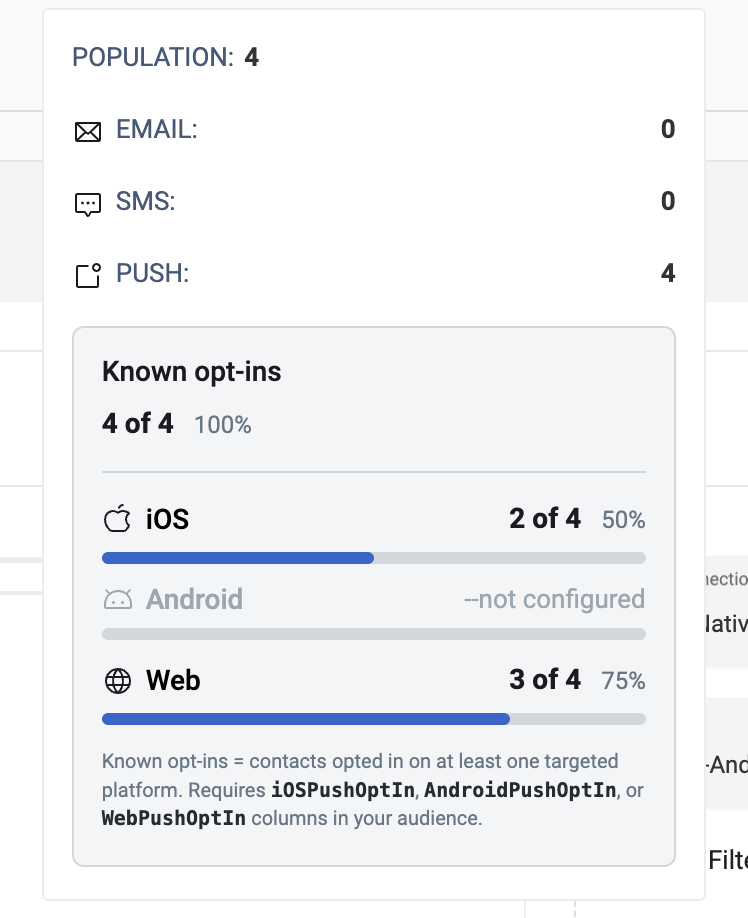
Platform shows "Not configured"
When a platform shows "Not configured" instead of a percentage, that's a setup gap, not a low opt-in rate. It means the audience query doesn't return the reserved column for that platform (iOSPushOptIn, AndroidPushOptIn, or WebPushOptIn), so there's no data to calculate an opt-in figure from. Don't read "Not configured" as "this platform performs poorly." It simply hasn't been wired up yet. A platform that is configured but shows a low percentage is a genuinely different signal worth investigating on its own terms, whether that's an opt-in prompt strategy issue or a smaller-than-expected engaged base on that platform.
Known opt-ins is zero across every platform even when columns are configured
If Known opt-ins shows zero (0) across every platorm, this points to a setup issue in the pipeline between the mobile SDK and the Real-Time Event Feed, not to an actual zero opt-in rate. Check the Real-Time Event Feed for incoming device permission-change events to confirm they're arriving as expected.
A configured column doesn't seem to be counted
If a platform's reserved column is present in the audience query but Known Opt-Ins still doesn't reflect it, confirm the column evaluates to boolean TRUE for opted-in rows rather than just being non-null. FALSE, 0, and null are all treated as not opted-in, even though the column is present and the platform isn't shown as "Not configured." Only TRUE or 1 counts toward Known Opt-Ins.
Job-level metrics show gap between sent and delivered
If job-level bounce or suppression analytics still show a gap between total sent and truly delivered after launch, this is expected. Known Opt-Ins is a visibility metric only. It does not filter or suppress the send. A push campaign still delivers to every contact with a MobileUserId, regardless of opt-in status.