Accelerator 26.2.3 release notes
Initiatives released
Scheduled Journeys
Scheduled Journeys introduces a powerful new orchestration capability that enables marketers to design, launch, and optimize multi-step customer experiences through a visual canvas.
Marketers can build scheduled, warehouse-backed flows that automatically evaluate audiences on a defined cadence, move customers through personalized sequences of messages and decision points (removing the burden of having to setup individual campaigns), and track performance from entry to exit by leveraging existing MessageGears native data warehouse connections.
Use case
Common scenarios where this feature adds value include:
- Welcome and onboarding flows — Automatically guide new customers through a structured introduction to your brand across email, push, and SMS.
- Abandoned cart and browse abandonment — Re-engage customers who showed intent but did not convert, with timely, personalized follow-ups.
- Cross-sell and up-sell campaigns — Segment customers based on purchase history or profile attributes and deliver targeted offers at the right moment.
- Churn prevention and win-back — Identify at-risk customers and and trigger a series of win-back messages until they re-engage.
- Renewal and subscription lifecycle messaging — Drive timely, data-driven communication aligned to each customer's subscription or contract stage.
Goals
- Enable marketers to self-serve in building multi-step, multi-channel orchestrations.
- Provide a flexible, scheduled evaluation model that supports a wide range of lifecycle and campaign use cases.
- Keep all data centralized and secure in your native data warehouse, including journey state information.
- Deliver a complete, end-to-end orchestration experience: from journey creation and canvas building through activation, state tracking, and analytics.
- Provide a wholistic and granular views of Journey performance to facilitate fast analysis and optimization
Journey canvas
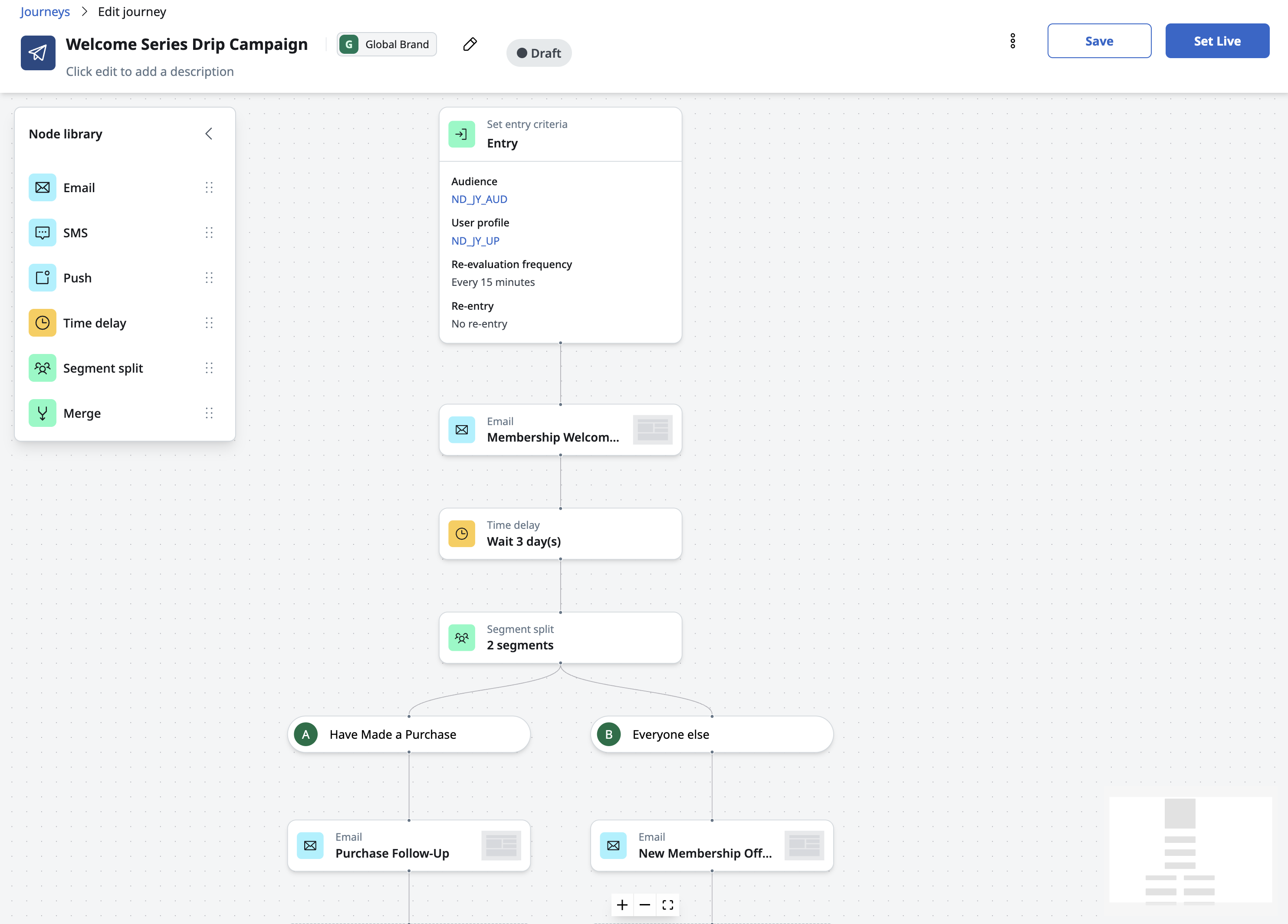
A new tile library and visual canvas allow teams to create customized journeys. Journeys are organized by brand/account with role-based access. They are managed through a new Journey Builder role.
Scheduled entry and evaluation
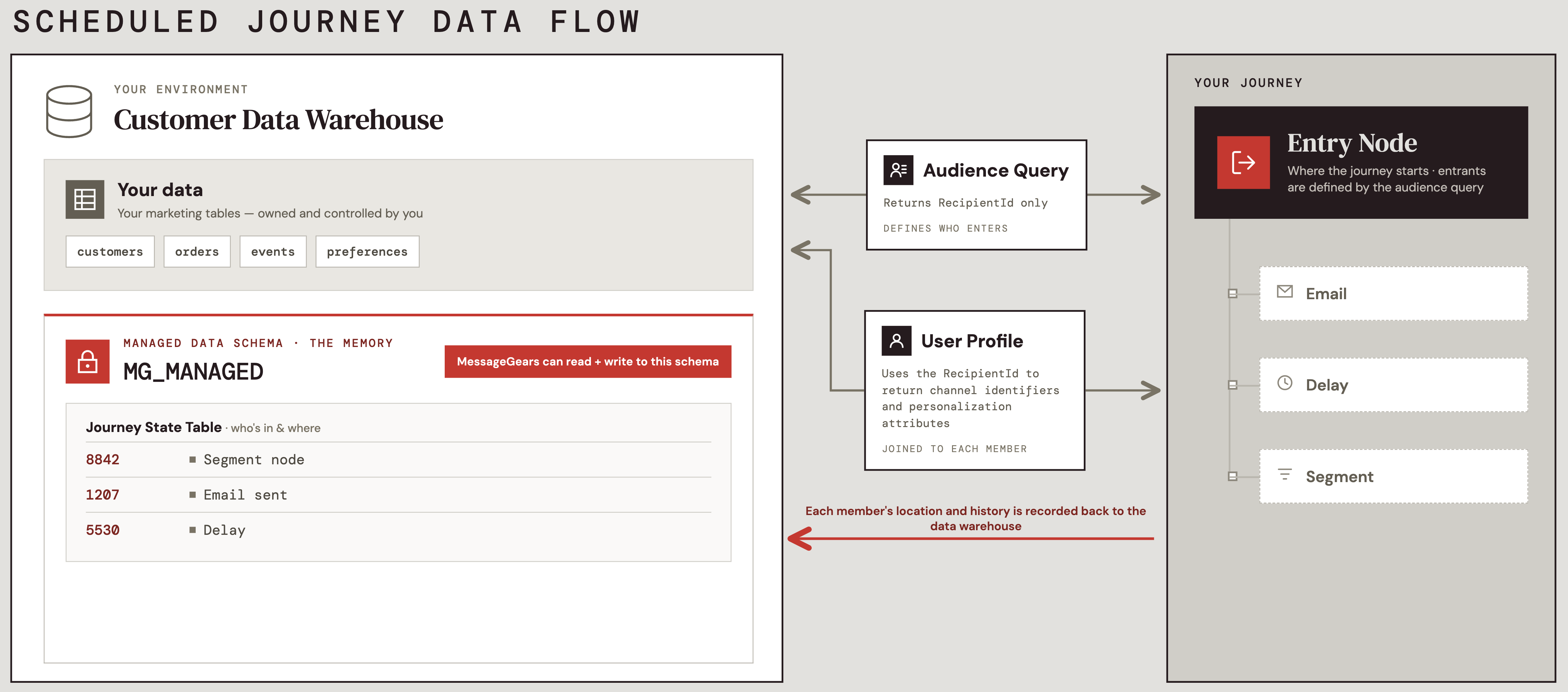
Journeys use a schedule-based evaluation for entry and progression. Marketers select an audience and configure an evaluation cadence. On each evaluation run, new entrants from the audience are identified, in-flight users are advanced through the canvas, and results are written to the new Managed data schema in the customer's warehouse. Re-entry rules support both a maximum number of entries and a time-based re-entry delay.
Canvas tiles
This release includes the following tile types for building orchestration flows:
- Entry Tile — Configures the audience and User Profile, journey evaluation frequency, and a join preview showing profile coverage across the selected audience.
- Email Activation Tile — Sends a selected email template to users with a valid email address.
- Push Activation Tile — Sends a push notification to users with a valid mobile device identifier.
- SMS Activation Tile — Sends an SMS message to users with a valid phone number.
- Multi-channel Activation Tile - Sends a message across multiple channels in a single step.
- Time Delay Tile — Pauses users in the flow for a defined duration before advancing them to the next step.
- Segment Tile — Branches users based on User profile attribute rules with a required Else branch for unmatched users.
- Percent Split Tile - Branches users based on random percentage distributions.
- Merge Tile — Rejoins multiple branching paths into a single downstream flow.
Preview and test
Before activation, marketers can preview rendered templates using sample recipients drawn from the User Profile and execute test sends across Email, Push, and SMS channels to validate content and delivery configuration.
Journey analytics
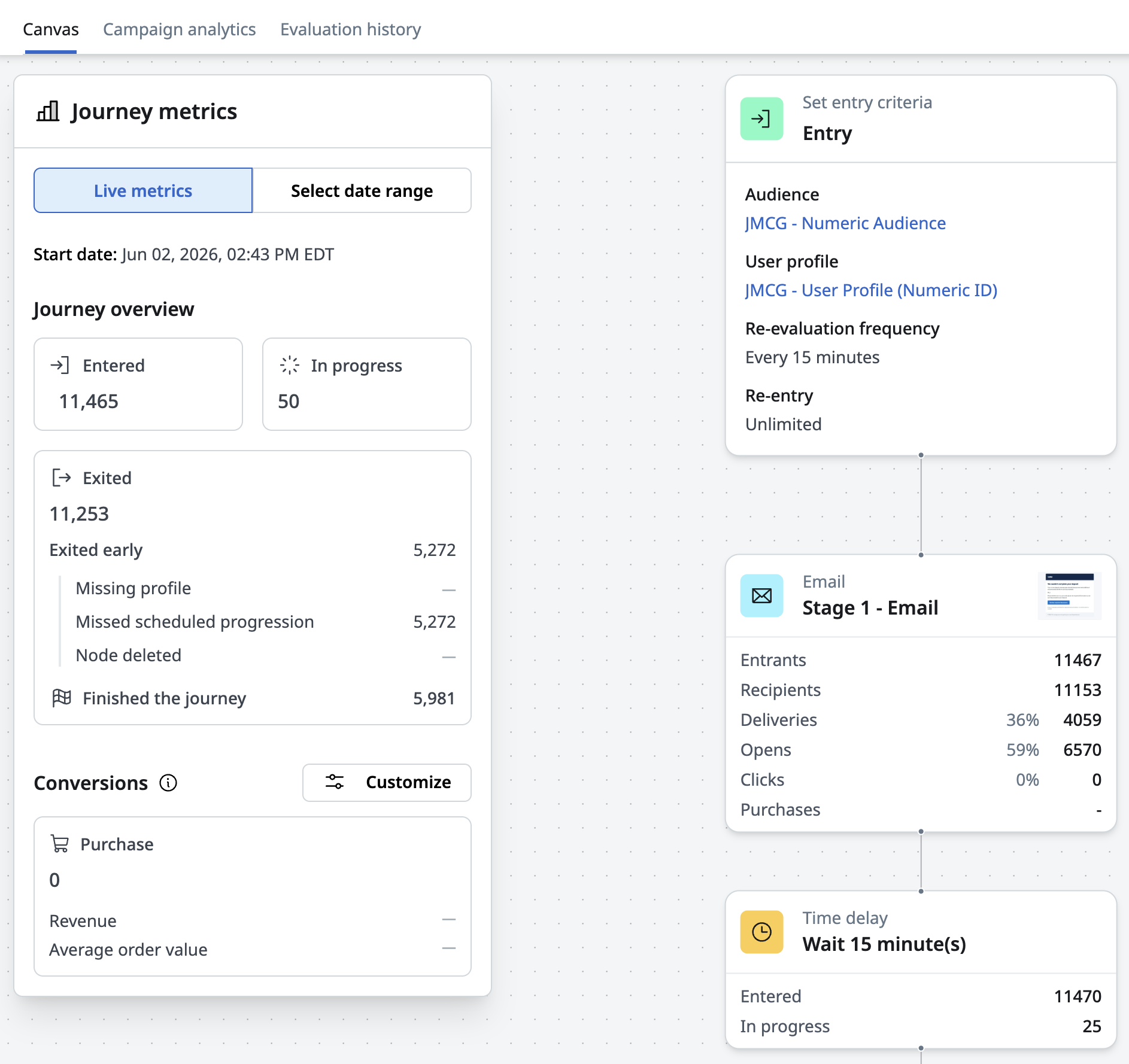
A Journey metrics panel on the canvas provides real-time and historical metrics across the full journey. Key journey-level metrics include entered, in-progress, and exited customers (broken down by exit reason). Conversion tracking supports up to two configurable conversion events drawn from Managed Events.
Tile-level metrics vary by type — activation tiles display recipients, deliveries, unique opens, clicks, and conversions; time delay tiles show entered and current in-progress counts.
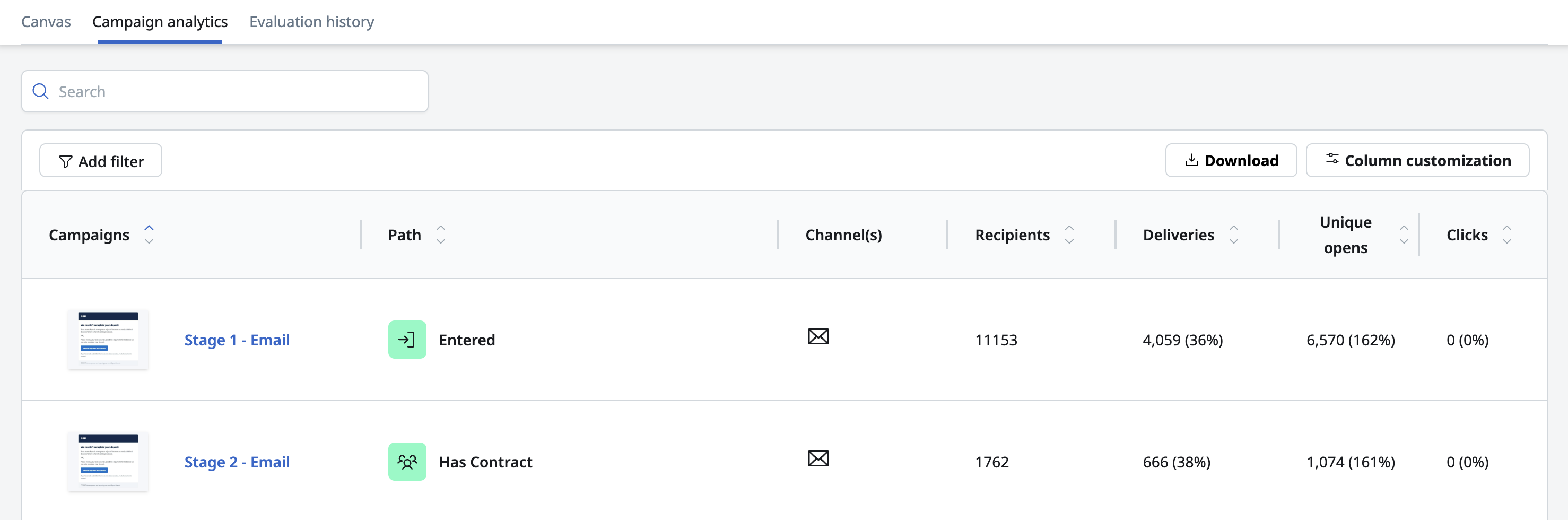
The Campaign analytics page provides a detailed, filterable view of messaging performance across all activation tiles, with columns for deliverability, engagement, and conversions, path-based grouping, support for deleted tile history, and CSV export.
Error handling and observability
A per-journey evaluation history table provides a record of the last 100 evaluations, allowing journey builders or analysts to quickly identify and understand the impact of any failed evaluations. The evaluation detail offers granular error reporting to help with diagnosing and resolving configuration issues resulting in failed evaluations. Email notifications are sent for critical journey-level errors, including the journey name, error summary, stage, and timestamp.
User profiles
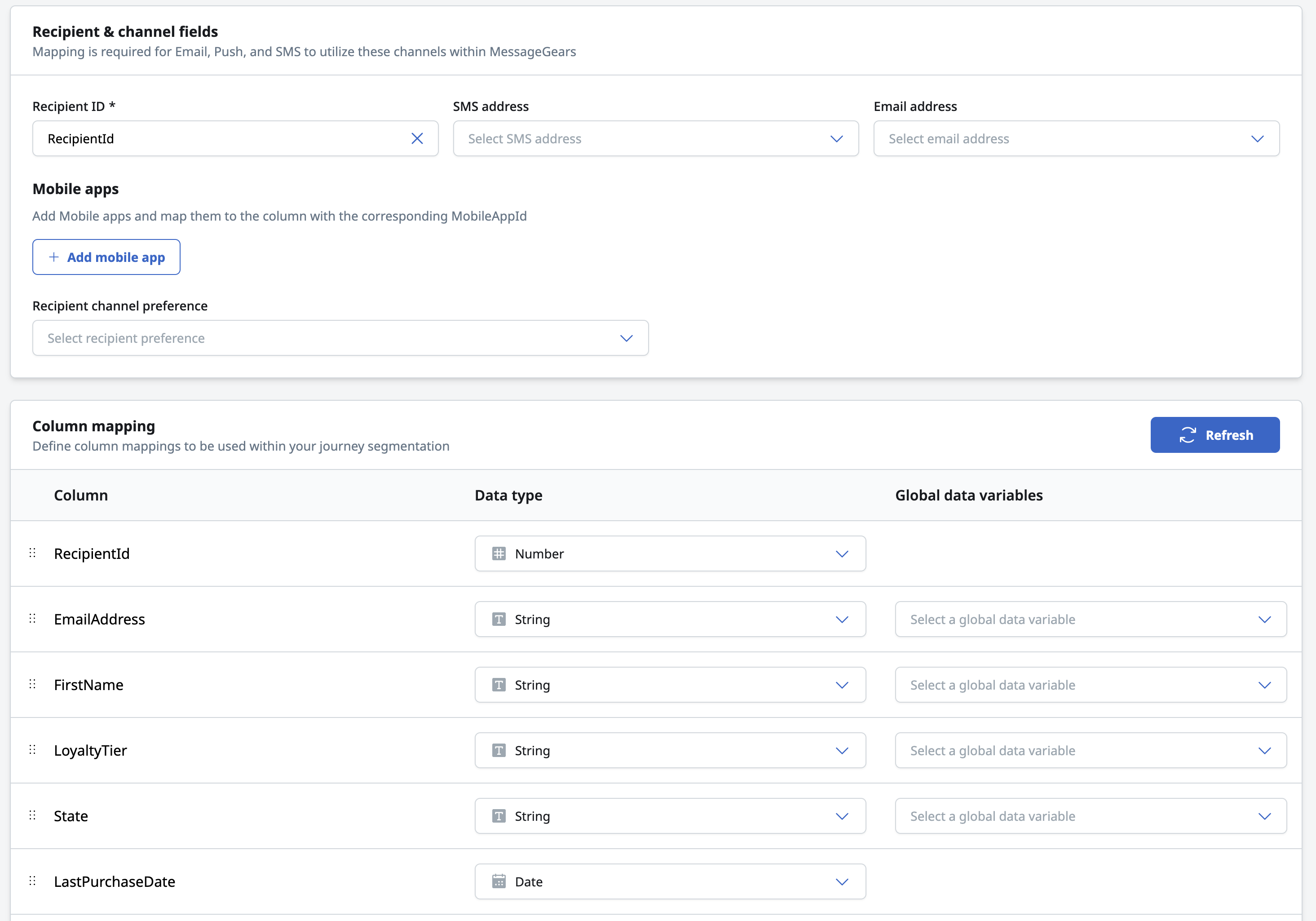
Our new User profiles define the customer attributes used for segmentation and personalization within a journey. Sourced straight from your existing native customer data warehouse connection, a user profile maps required identifiers (recipient ID, email address, SMS address, mobile user IDs) and supports nested data fields and global variables.
Learn more about User profiles.
Managed data schema
The new Managed data schema automatically provisions and maintains warehouse tables to persist journey state. MessageGears handles updates behind the scenes, keeping journey state data accurate and up to date without requiring any work from the customer. Teams can launch and iterate on journeys faster while keeping all journey state data secure, accessible, and co-located with their existing customer data in their own native warehouse.
Learn more about Managed data schema.
General changes
There have been no general enhancements or fixes included with the 26.2.3 release.