Accelerator 23.2.0 release notes
Initiatives Released
Blueprint Chaining
Use Case Customers regularly go through data transformation workflows to create and use audience segments. These transformations might be simply repeated business logic steps, or they can include staging audiences to prepare for a time period of marketing. Blueprint Chaining will empower Marketers to apply grouped business logic to a larger audience in order to stage audiences for campaign activation. Each staged audience can be leveraged by a Campaign to apply specific segmentation needs and program delivery.
Goals
- Allow marketers to create groups of Blueprint logic that they can then chain together.
- Simplify mass Blueprint Edits to allow for centralized modifications to cascade to other Blueprints
- Streamline the Blueprint creation experience, to allow Marketers to quickly connect and refine Blueprints
Capabilities
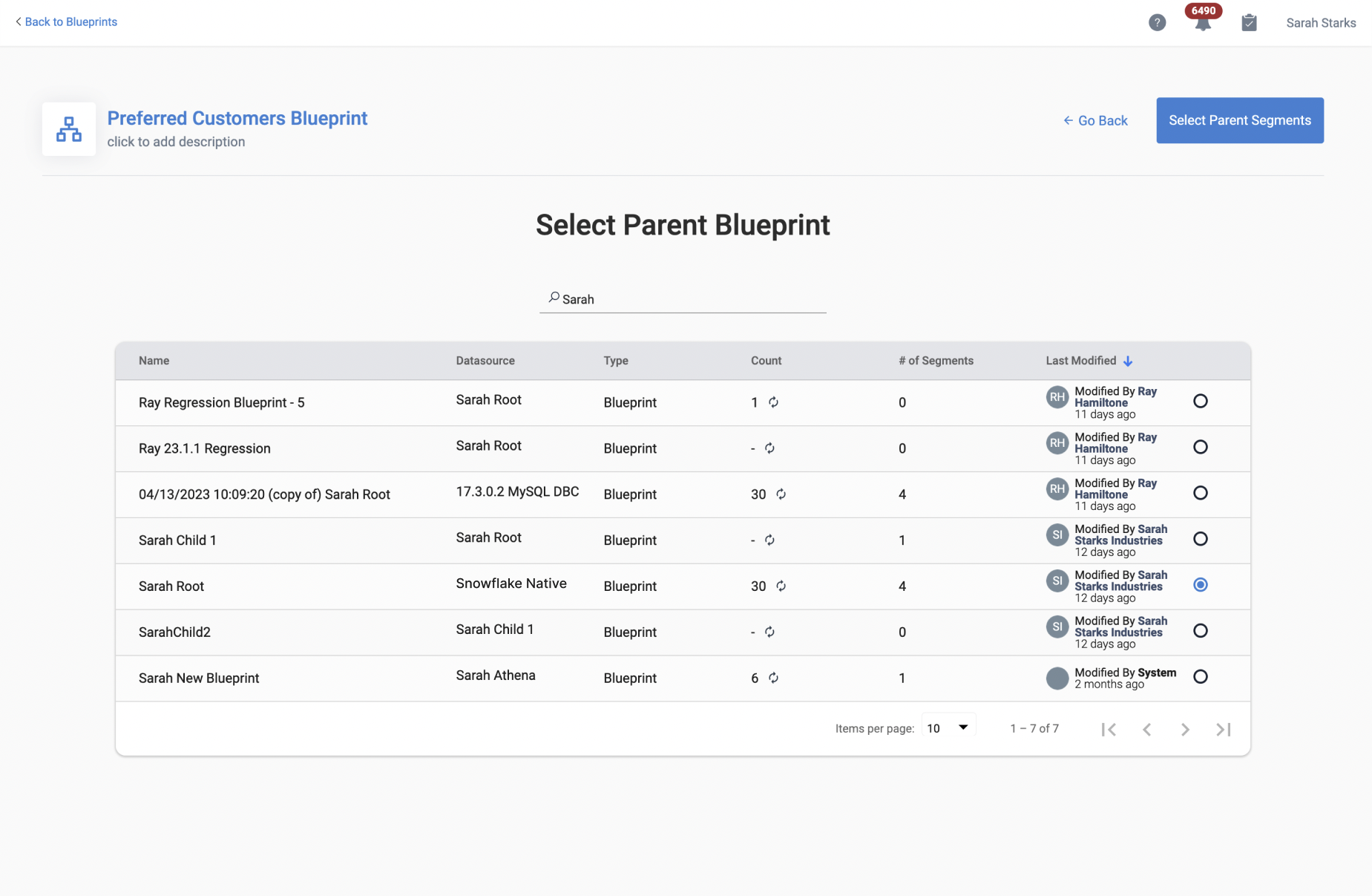
Creating a Blueprint Chain When creating a Blueprint, users now have the ability to declare the initial source the output of another Blueprint instead of a database connection; creating a new concept in Accelerator - the Blueprint Chain. This association can be done either during the initial Blueprint creation in the new creation stepper flow, or while editing an existing Blueprint. Depending on marketers' needs, Blueprint Chains can target specific nodes from each Blueprint in the Chain, having one feed into the next as needed.
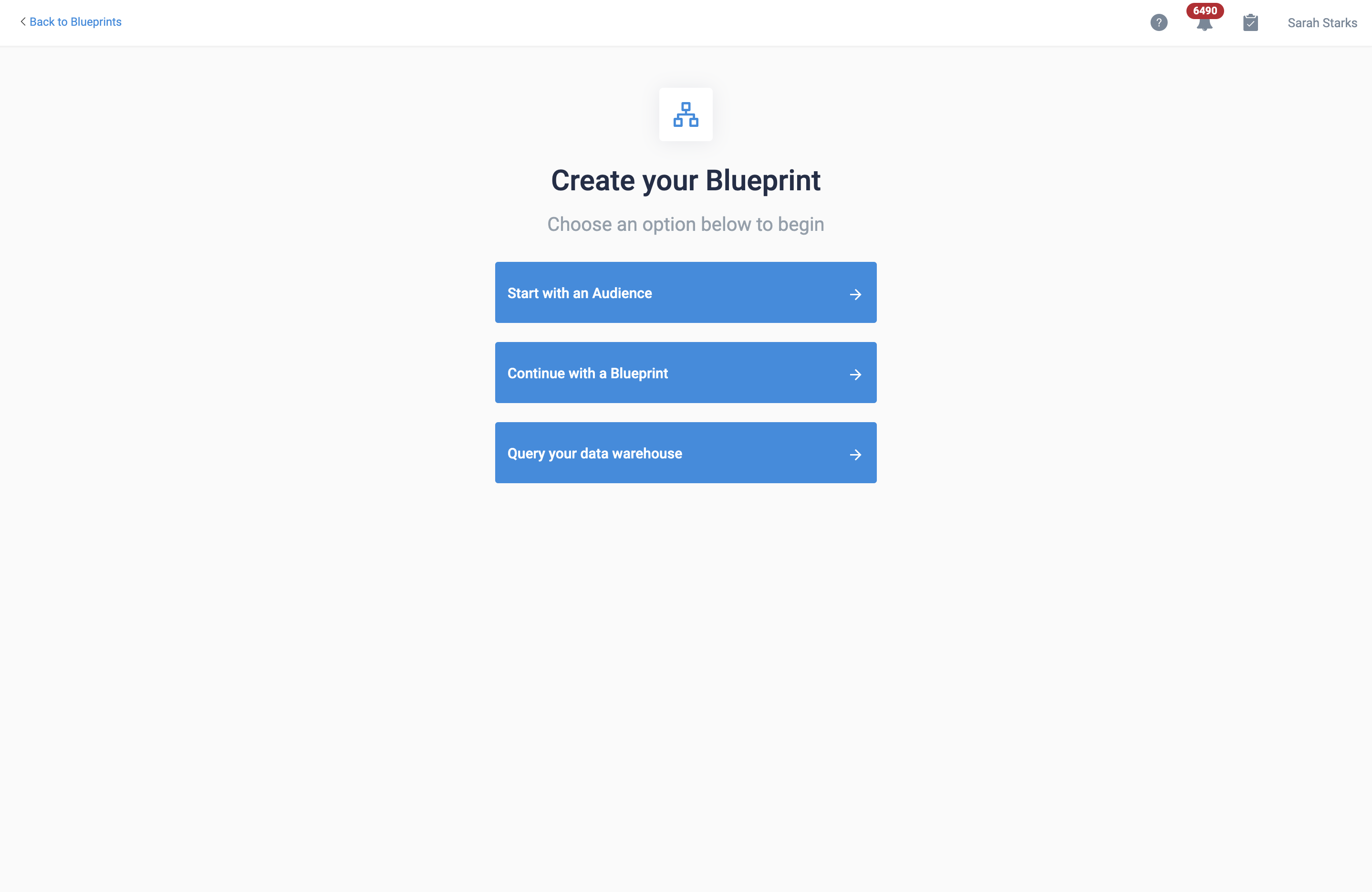
Improved Blueprint Creation Experience Since there are multiple avenues users could travel to create a Blueprint, we are introducing a more streamlined creation experience to help decision making. When users are creating a new Blueprint, they’ll have dedicated options for creating from a blank query, using an existing query from another Audience or Blueprint, and continuing a Blueprint Chain. Each option will have a different flow depending on selection, and users will be able to declare the Audience being copied or Parent Blueprint during creation.
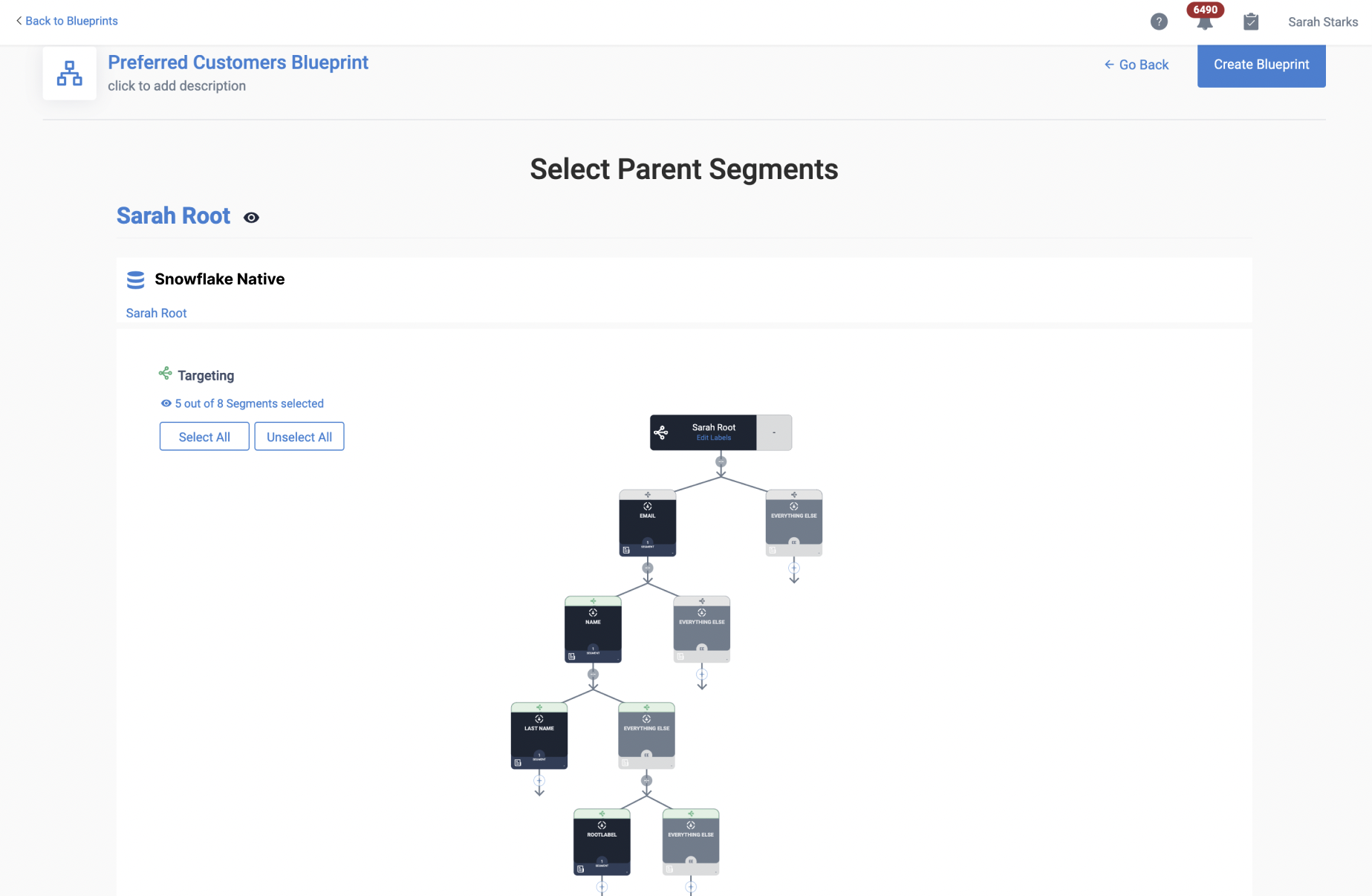
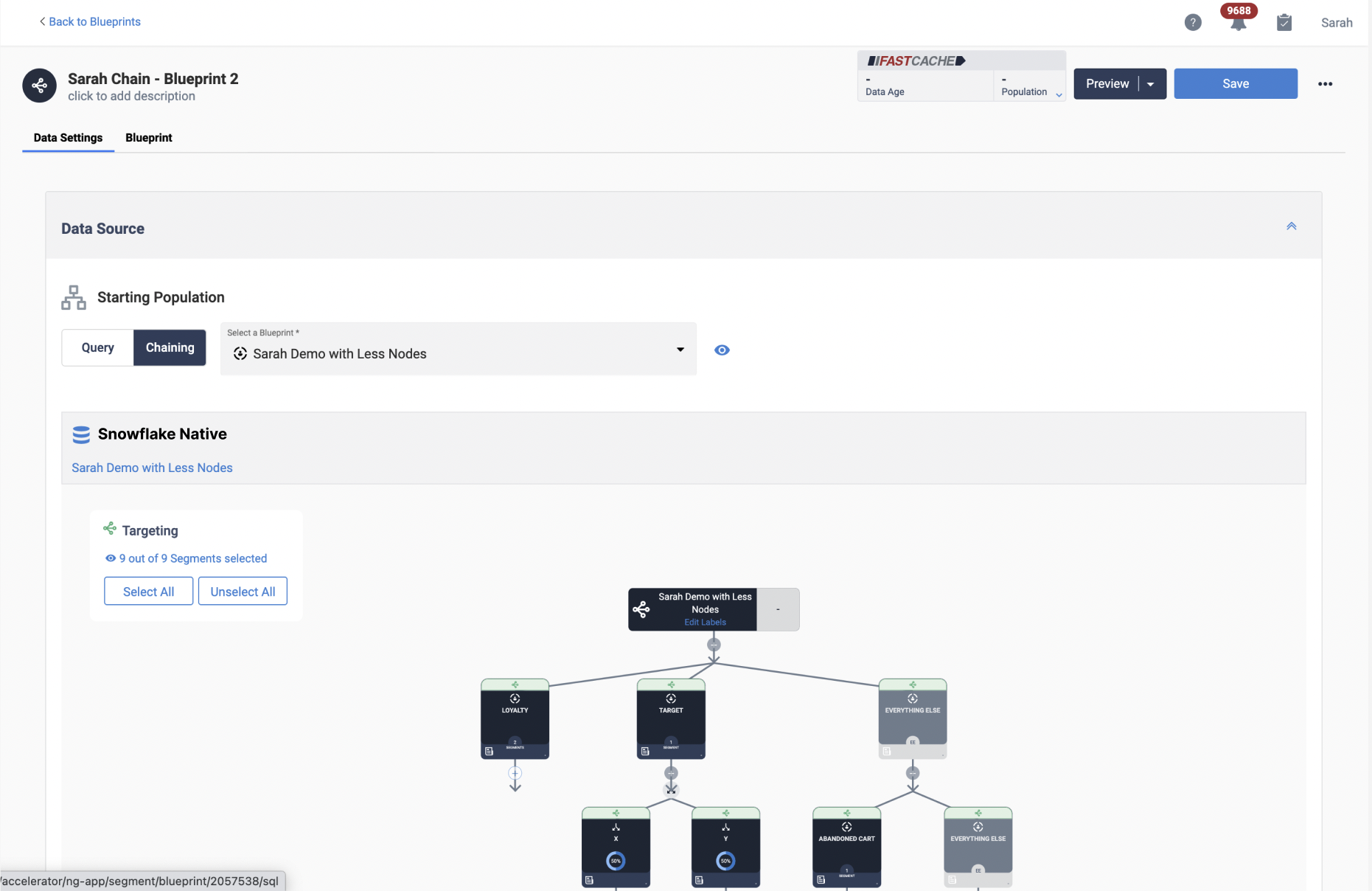
Improved Blueprint Edit Page On the Blueprint Edit page, users will now have a toggle between Query and Blueprint to declare what should be used as the starting population. Query uses the standard SQL query window, while the new Blueprint option provides users the ability to select a Parent Blueprint and which nodes from that Parent should act as the starting population. Data Variables and Labels have been given static spaces above the new toggle to make this page more UX friendly, and within the actual canvas for the blueprint, the static starting population node will now dynamically show icon and verbiage appropriate to if the blueprint is using a query or blueprint as its base.
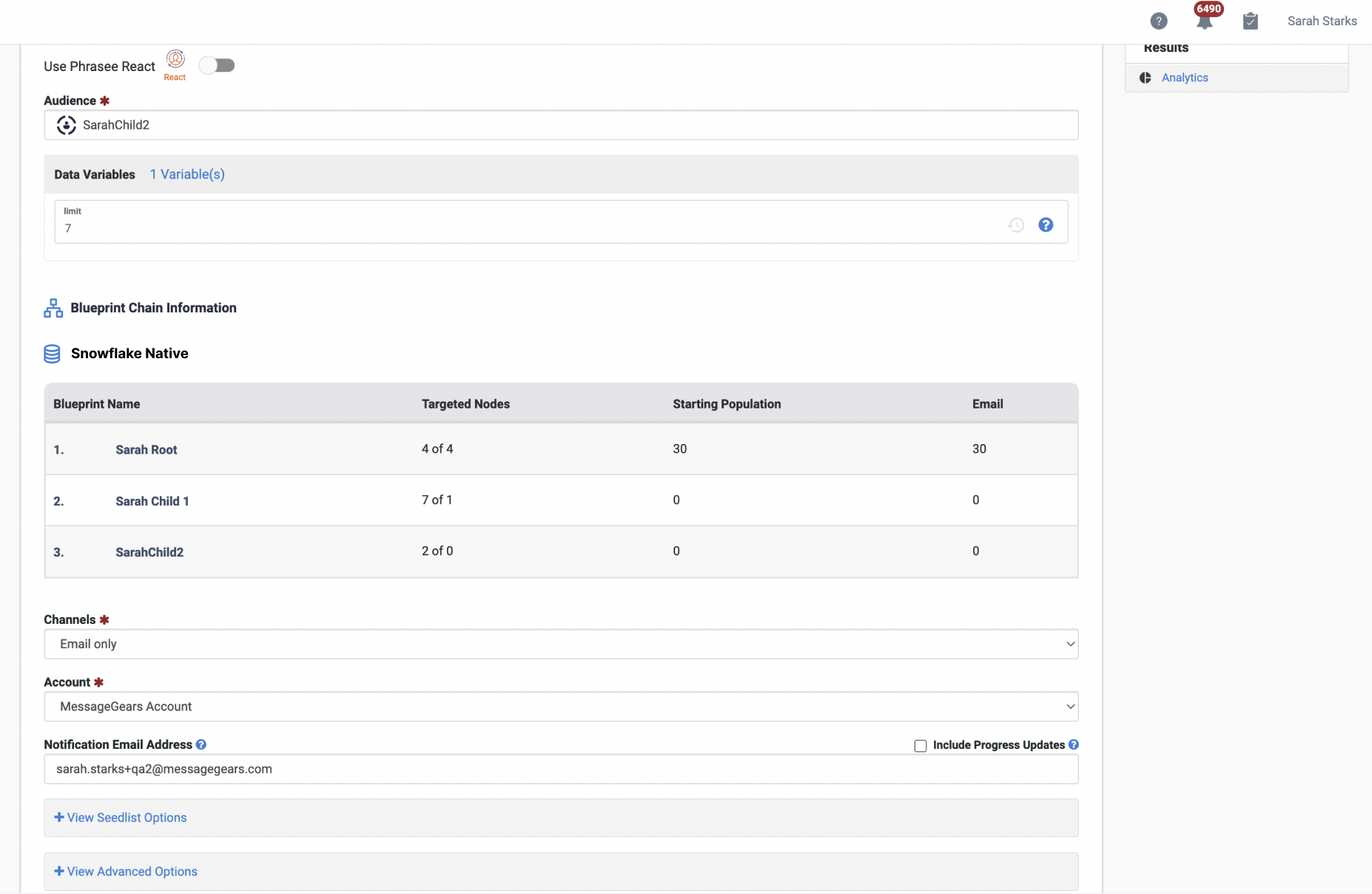
Surfacing Blueprint Chain Information When a Blueprint which is within a Chain is associated to a Campaign, Accelerator will display the full chain of Blueprints on the Settings screen. Users will be able to see each Blueprint in the chain, and some ancillary information about that Blueprint including it’s targeted nodes and starting population.
Updated Dashboard
Use Case
Previously, the dashboard experience was split between 3 separate pages which offered a wealth of overarching information about what was happening in Accelerator. We wanted to provide a better experience to answer the same questions for users, while bringing tangible improvements to the way we are organizing and displaying that information. We’ve also begun the process of restyling Accelerator’s UX to bring a more modern look and feel. Users should find improved search functions on scheduled and recent jobs, better grouping around jobs which relies less on what campaign type it originated from, far more filtering options, more modern display for tables (including column adjustment), and more legible graph displays.
Goals
- Give users a better experience seeing the metrics for Accelerator jobs
- Update the way users search for and find specific jobs for troubleshooting
- Surface more ancillary information around many aspects of the records being displayed on the dashboard
- Allow for a more channel specific experience on the dashboard
- Remove the need to navigate to different pages to see all this information, and centralize the experience
Capabilities
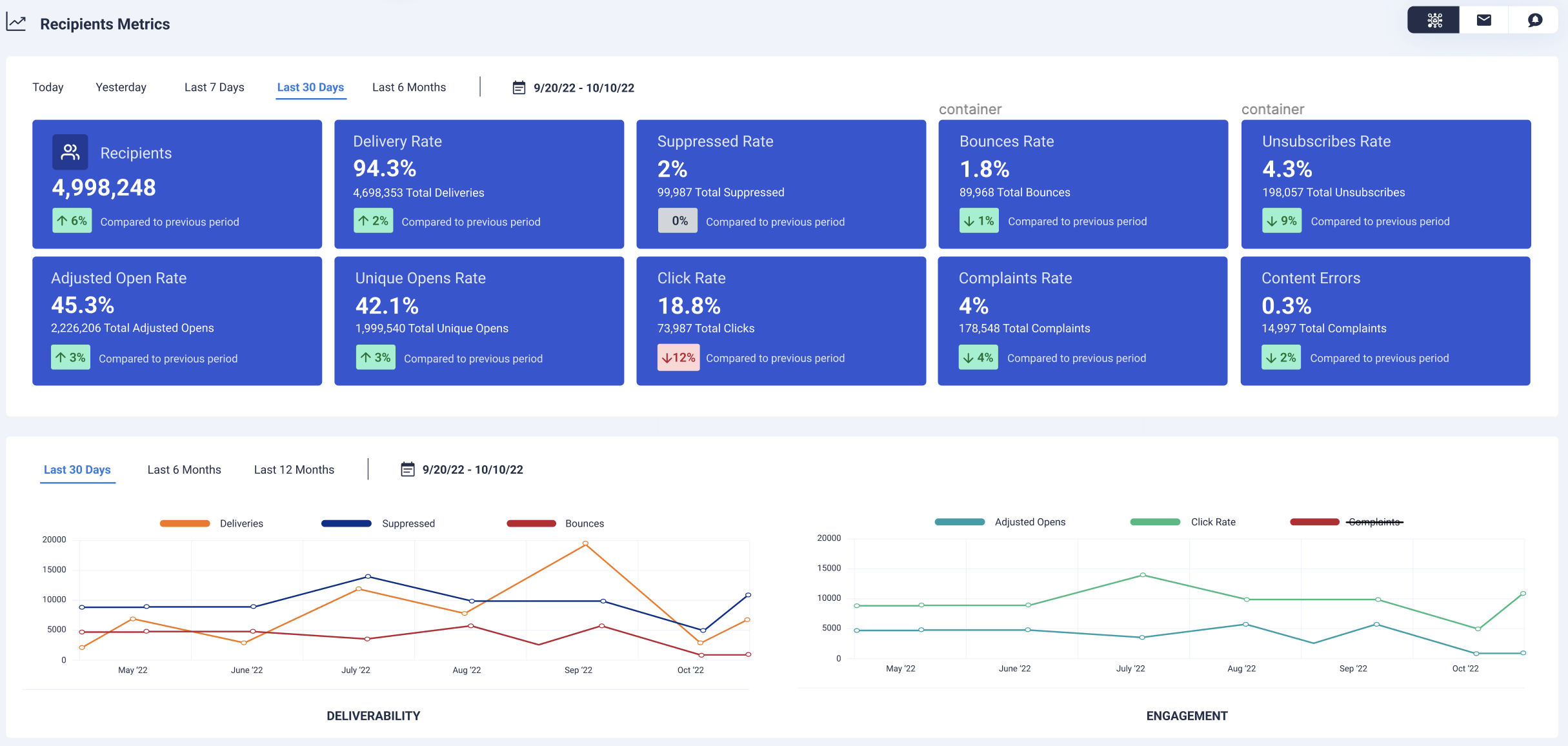
Recipients Metrics Users now have the ability to see base metrics per channel displayed in modern card format, along with % rates and comparison rates to show increase or decreases when compared to previous time frames. This widget now allows for some additional date range options, and will now show the exact date range being used to calculate those numbers. Below the cards is our new Deliveries and Engagement graphs, which feature multiple metrics dynamically graphed alongside each other to show trends over time. Each line graph also features coordinates to show exact totals being used for that day or month’s metric. Users can now dynamically remove metrics they don’t wish to see in the graphs by selecting them on/off from the legend which sits above each graph.
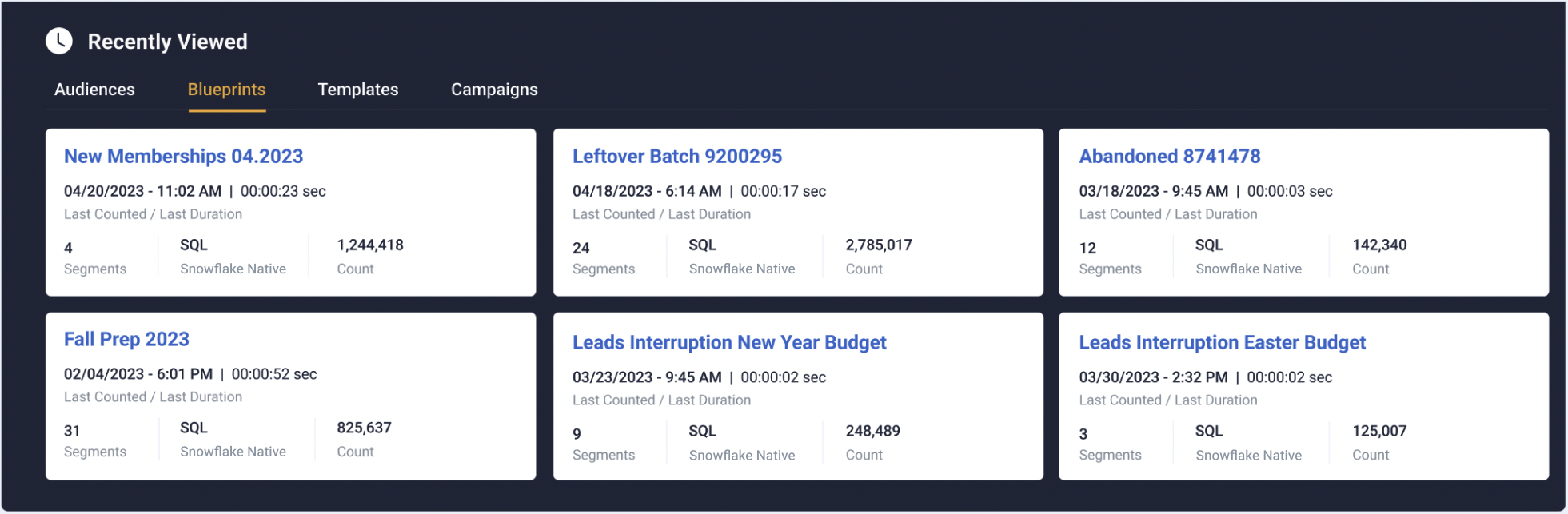
Recently Viewed Users will see that the Recently Viewed tables have been redesigned to show additional ancillary data around the asset. Audiences and Blueprints have been split up to better showcase additional information around each asset. Blueprints will also show when they are apart of the new Blueprint Chain functionality, surfacing the parent Blueprint and allowing users direct navigation to it if needed.
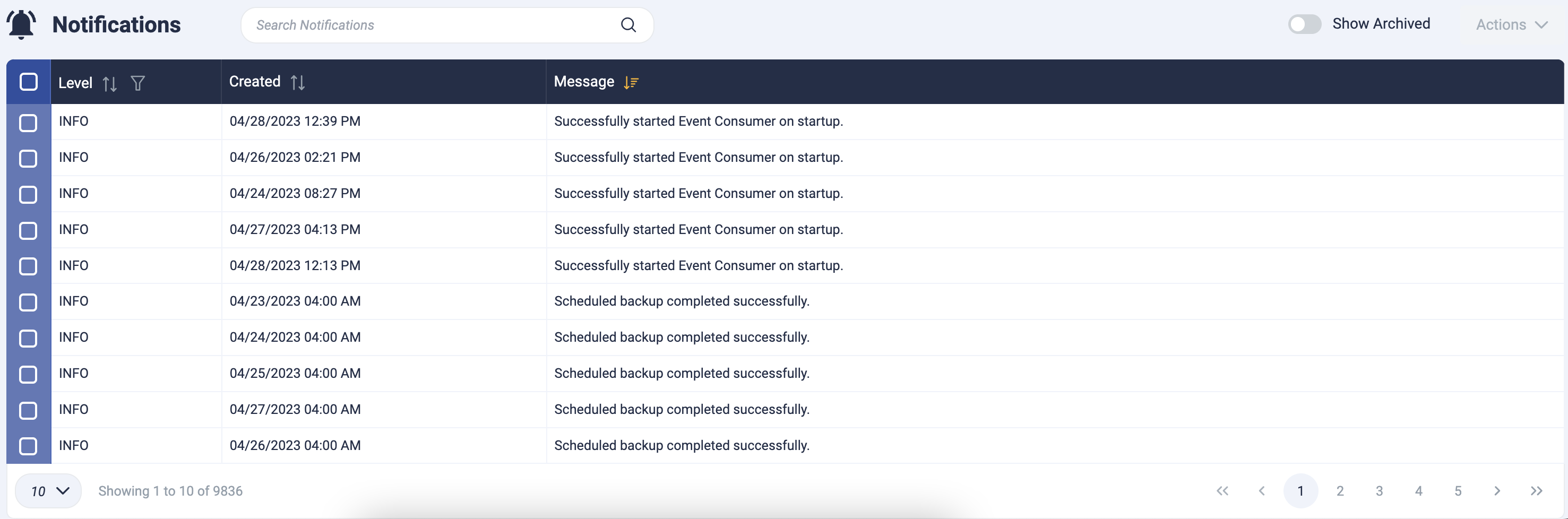
Notifications The Notifications table has been updated with some new functional tools; now allowing for column width adjustment, column value filtering, and tooltip on hover which will display the full text in the message.
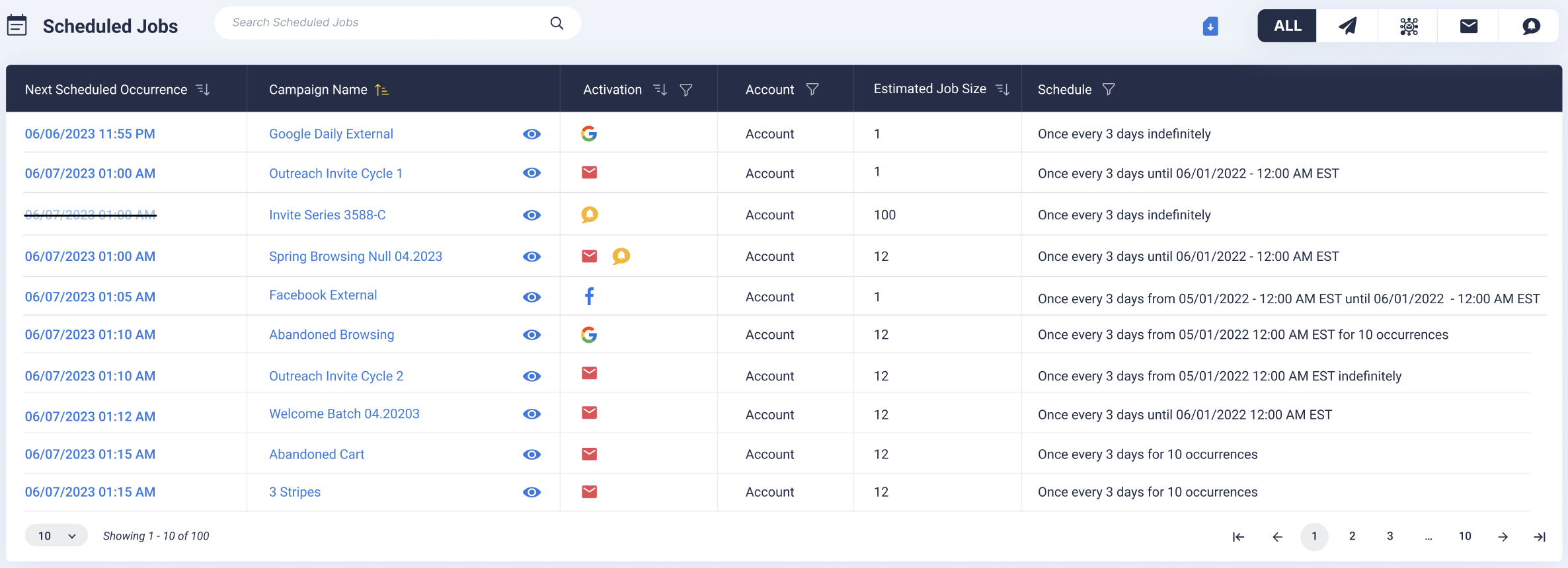
Scheduled Jobs The Scheduled Jobs table has been updated with new functionality tools for searching and filtering. We’ve also added in Account and Activation columns for each job. Account will display the associated Account to the job, while Activation will show what channel(s) or destination the job is scheduled for. Each campaign will also have a quick view modal icon available, which when selected will provide a list of additional settings associated to the Campaign which cannot be seen in the table. Users will be able to see the Campaign’s associated Audience, Template (including thumbnail) or Destination, Audience Recording, Last Date Modified, and more.
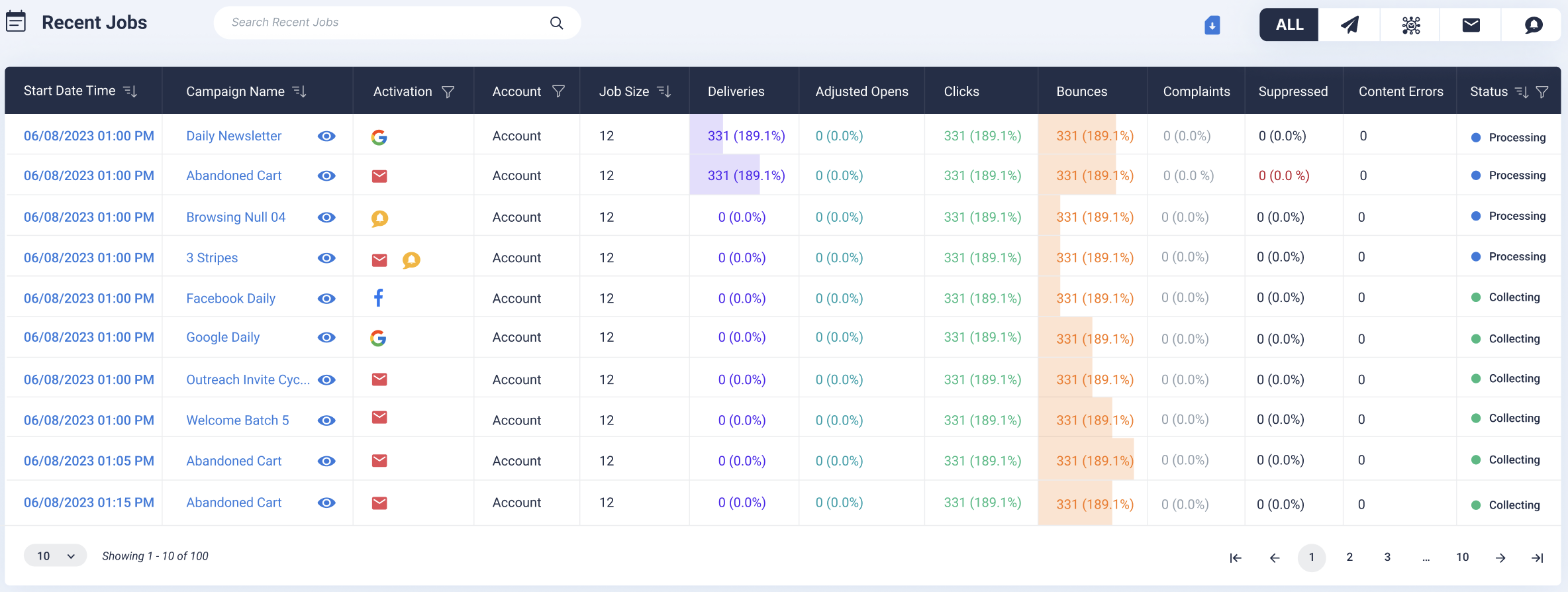
Recent Jobs The Recent Jobs table has now unified both the previous recent cross channel and recent external jobs tables, which allows searching and filtering across multiple campaign types. A channel filter is available for the whole widget, so if users only want to see External Jobs they’ll have the option to narrow the experience without engaging the table filters directly. Each campaign will also have a quick view modal icon available, which when selected will provide a list of additional settings associated to the Campaign which cannot be seen in the table. Users will be able to see the Campaign’s associated Audience, Template (including thumbnail) or Destination, Audience Recording, Last Date Modified, and more.
Updated Campaign Scheduler
Use Case
External Campaign schedules are getting a face lift! We want to create a consistent experience across campaign types so Campaign Admins can always create the same type of schedules for their campaigns. The first step to achieve this is to expand the functionality of the External Campaign Scheduler so it is more robust. In this release, External Campaign scheduler UI will be updated, and Marketing Campaign scheduler functionality will be replaced with this new schedule on the back end. Prior to this update, scheduled Marketing campaigns would break during Daylight Savings time changes, causing a lot of pain for Campaign Admins. This update will resolve the issues around Daylight Savings Time.
Goals
- Allow marketers to more easily make advanced scheduling scenarios via the updated scheduler interface
- Allow technical marketers to use a cron trigger preview to make sure that even the most advanced scheduling scenarios are accurate
- Simplify the scheduling logic to make a consistent delivery for all activations
####⠀Capabilities Days of the Week Filter on Weekly Schedule Types When creating a Weekly schedule on External Campaigns, users now have the ability to add a filter for which days of the week the schedule should launch on. The schedule will always launch on the day of the week that the start date falls on, and users can add any other additional days of the week for the schedule to launch on.
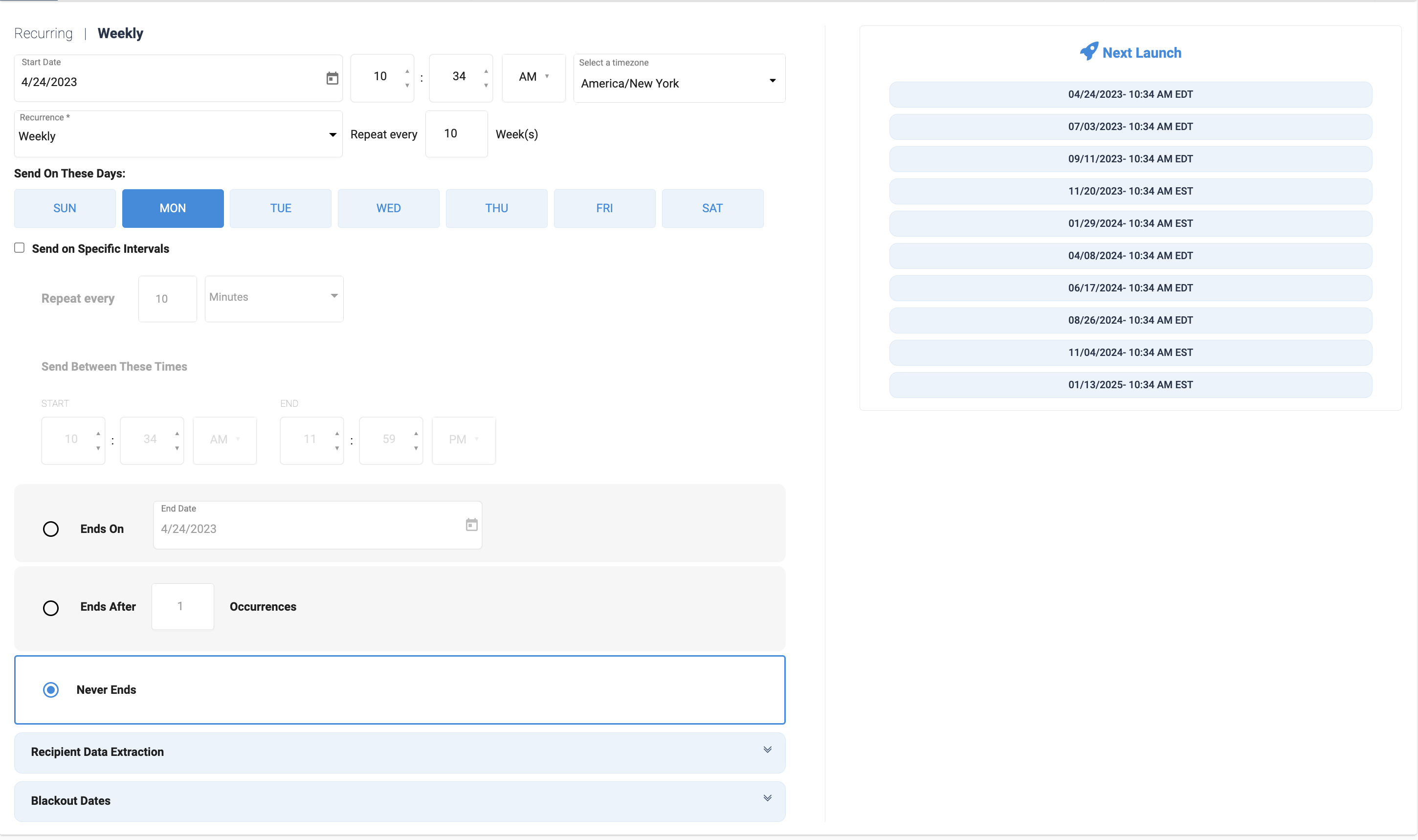
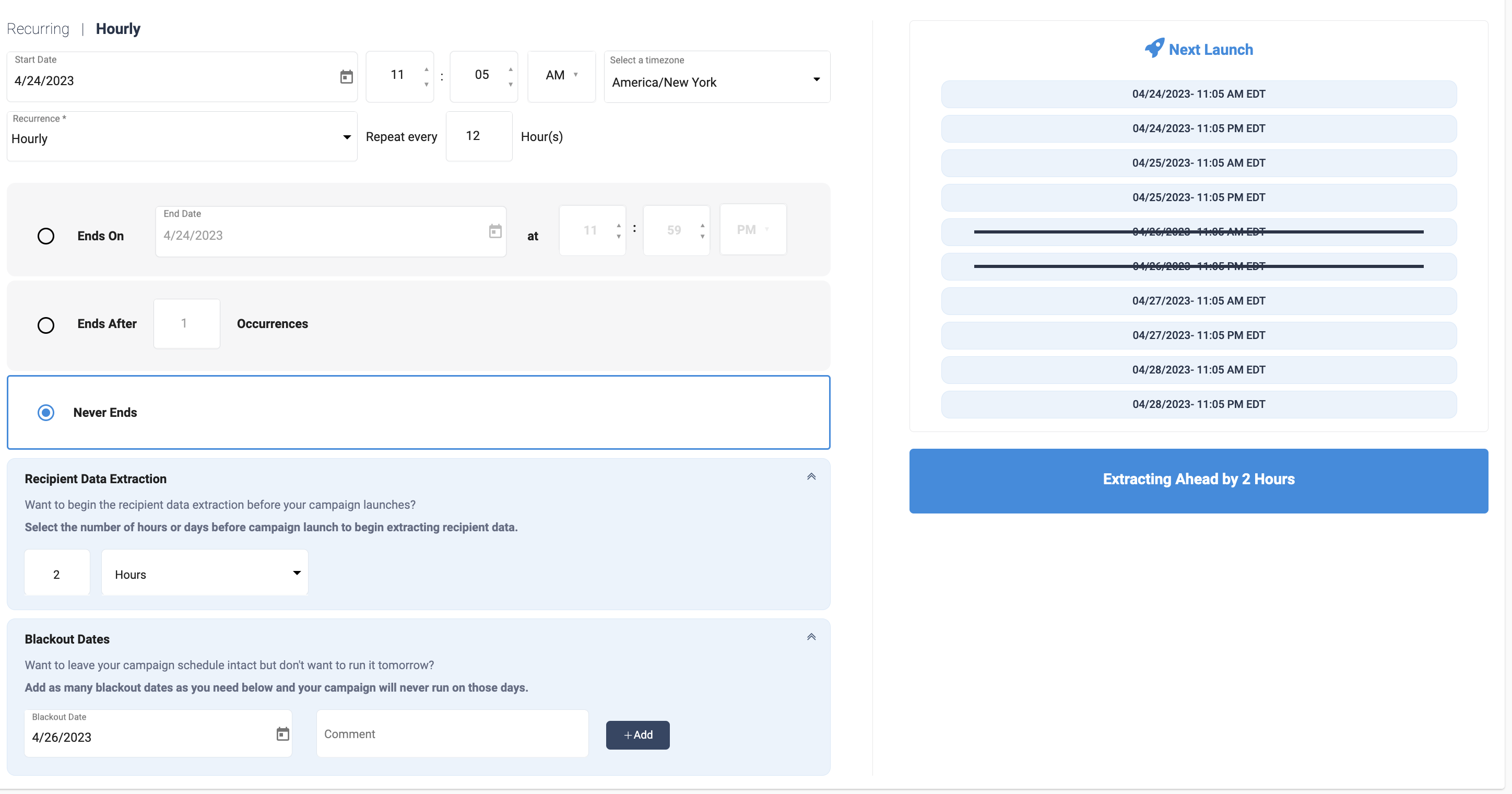
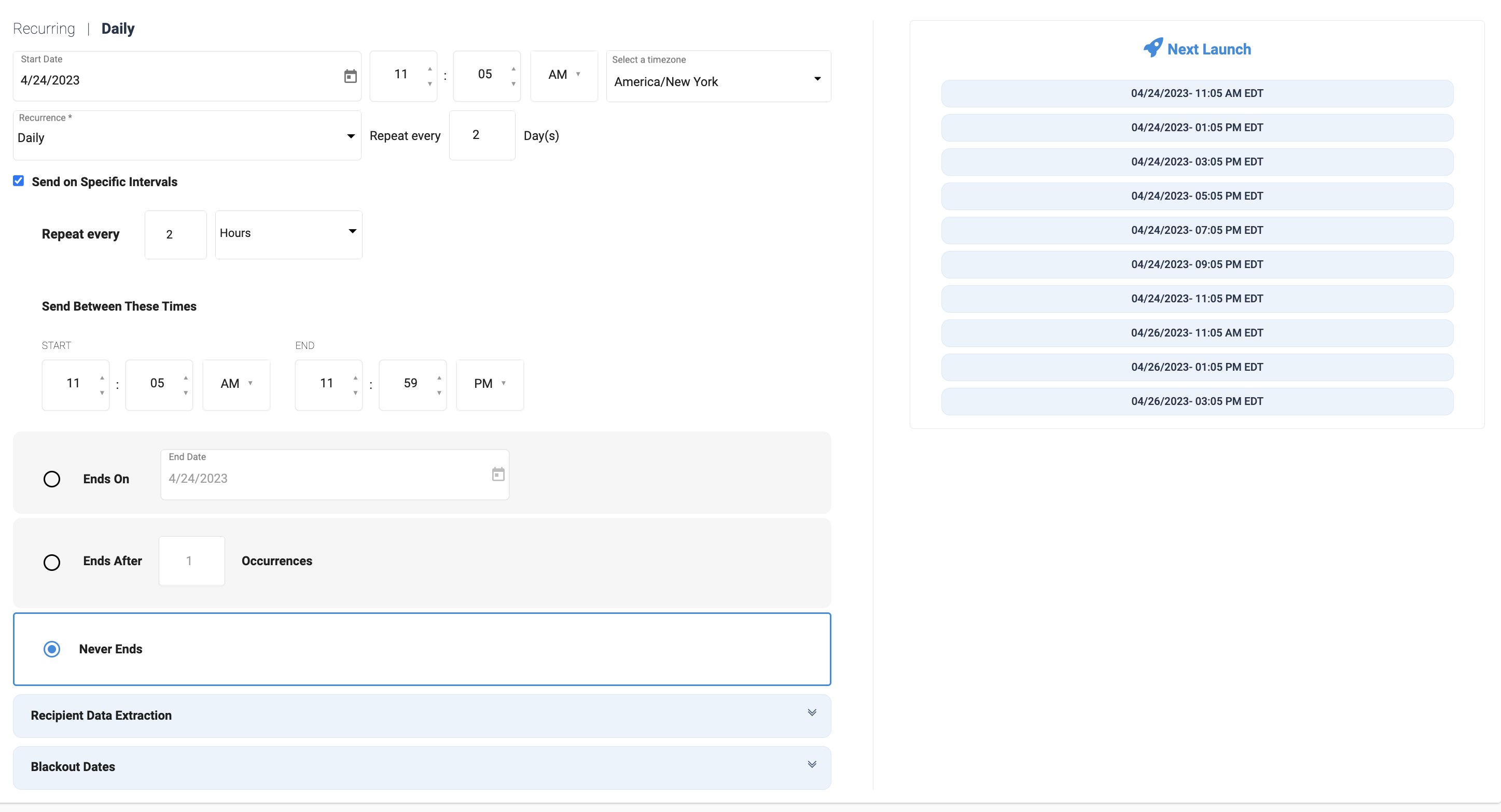
Send Interval and Send Window on Daily, Weekly, and Monthly Schedule Types Users now have the option to add intervals and send windows to specific schedule types. When selected, this option will enable a section of the scheduler to set a minutely or hourly interval, and specify a window for the launches to occur in from 12:00am to 11:59pm.
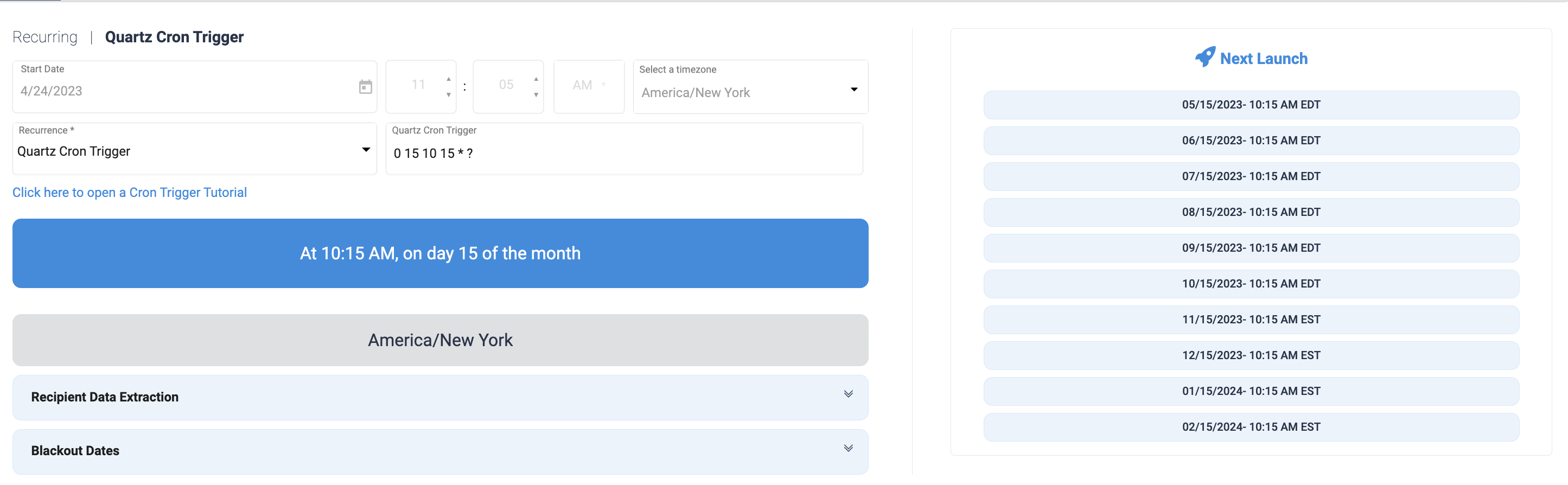
Quartz Cron Trigger Quartz Cron Triggers can now be configured for External Campaigns. Users will be able to access a tutorial from this schedule type, and Accelerator will translate the trigger to a human-readable schedule.
Recipient Data Extraction Users can now extract their recipient data ahead of the scheduled run time on External Campaigns. Users will be able to choose an extraction as short as 1 hour ahead of the scheduled launch, or as long as 5 days ahead of the scheduled launch.
Blackout Dates Users can now add Blackout Dates to External Campaigns to prevent a scheduled launch from occurring on a specified date. This functionality will allow users to skip the launch on a date without having to pause their schedule.