How do I send events with deeplinks?
This article provides examples of how to use deeplinks to send events. These examples show how to implement deeplinks both from within your app or by linking to your app from a partner app.
Implementing the below examples in your code enables your Swrve users to send events via deeplinks from in-app messages of the form: swrve://?event=
- iOS
- Android
- Unity
[SwrveSDK messaging].customButtonCallback = ^(NSString* action){
NSURL *url = [NSURL URLWithString:action];
double delayInSeconds = 0.25;
dispatch_time_t popTime = dispatch_time(DISPATCH_TIME_NOW, delayInSeconds * NSEC_PER_SEC);
dispatch_after(popTime, dispatch_get_main_queue(), ^(void){
if ([url.scheme isEqualToString:@"swrve"]){
NSArray *pairs = [url.query componentsSeparatedByString:@"&"];
for(NSString *pair in pairs){
NSString key=[[pair componentsSeparatedByString:@"="] objectAtIndex:0];
NSString value=[[pair componentsSeparatedByString:@"="] objectAtIndex:1];
if([key isEqualToString:@"event"]){
[SwrveSDK event:value];
}
}
[SwrveSDK sendQueuedEvents];
}
else{
[[UIApplication sharedApplication] openURL:url];
}
});
}
SwrveSDK.setCustomButtonListener(new SwrveCustomButtonListener() {
@Override
public void onAction(final String customAction) {
final int EVENT_DELAY_MILLISECONDS = 250;
ScheduledExecutorService timedService = Executors.newSingleThreadScheduledExecutor();
timedService.schedule(new Runnable() {
@Override
public void run() {
Uri uri = Uri.parse(customAction);
if(uri.getScheme().equals("swrve")) {
for( String key: uri.getQueryParameterNames() ) {
final String value = uri.getQueryParameter(key);
if(key.equals("event") ) {
SwrveSDK.event(value);
}
SwrveSDK.sendQueuedEvents();
}
}
}
}, EVENT_DELAY_MILLISECONDS, TimeUnit.MILLISECONDS);
}
});
In the Unity SDK, it is important to set up the custom button listener when the SDK is initialized. This is done by adding the following code as the SDK is initialized:
SwrveComponent.Instance.SDK.GlobalCustomButtonListener = new CustomButtonListener();
The custom button listener is then included in:
private class CustomButtonListener : MonoBehaviour, ISwrveCustomButtonListener
{
private IEnumerator DelayedNamedEvent(string eventName, Dictionary<string, string> payload = null) {
yield return new WaitForEndOfFrame();
SwrveComponent.Instance.SDK.NamedEvent(eventName, payload);
}
public void OnAction (string customAction) {
// Custom button logic
try{
Uri uri = new Uri (customAction);
if ( uri.Scheme == "swrve") {
NameValueCollection query = new NameValueCollection();
foreach (string vp in Regex.Split(uri.Query.TrimStart ('?'), "&")) {
string[] singlePair = Regex.Split(vp, "=");
if (singlePair.Length == 2) {
query.Add(singlePair[0], singlePair[1]);
}
else {
query.Add(singlePair[0], string.Empty);
}
}
if(!string.IsNullOrEmpty( query.Get("event"))){
StartCoroutine(DelayedNamedEvent(query.Get("event")));
}
}
else{
Application.OpenURL(customAction);
}
}
catch(UriFormatException exception){
// log bad uri
}
}
}
By allowing your Swrve users to send custom events via deeplink, you can track which app users engaged with campaigns. This allows targeting of these users or linking of in-app message campaigns. It is also possible to expand this code for different key-value pairs to allow deeplinks to send user properties, purchases, and so forth.
Use case
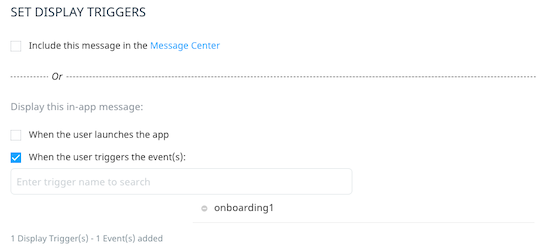
The key use case for sending events via deeplink is enabling your Swrve users to link in-app message campaigns. In the following example, you can create a tutorial flow of messages in Swrve without any changes to your code—once your app is set up to send events via deeplink.
The first message can be triggered by any event, such as visiting the home screen, once the action is a deeplink which sends a custom event:
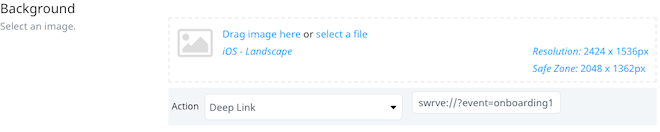
Subsequent messages can then be triggered by the event fired by the previous message: