Computing lifetime value
Tutorial objective: Get comfortable with the monetization and user data exposed by the Swrve User DBs and generate initial LTV estimates.
Run install date cohorted query
The following is an example query that computes interesting lifetime value (LTV) related metrics for each of your users. It groups users by install date for cohort analysis.
- Redshift
- MySQL
SELECT DATE_TRUNC('day', date_joined) AS install_date,
COUNT(1) AS user_count,
AVG(DATEDIFF(day, date_joined, last_active)) AS average_lifetime,
SUM(spend) / 100 AS spend_usd,
SUM(spend)::float8 / 100 / COUNT(1) AS arpu_usd
FROM swrve_properties
GROUP BY DATE_TRUNC('day', date_joined)
ORDER BY DATE_TRUNC('day', date_joined) ASC;
SELECT DATE(date_joined) AS install_date,
COUNT(1) AS user_count,
AVG(DATEDIFF(last_active, date_joined)) AS average_lifetime,
SUM(spend) / 100 AS spend_usd,
SUM(spend) / 100 / COUNT(1) AS arpu_usd
FROM swrve_properties
GROUP BY DATE(date_joined)
ORDER BY DATE(date_joined) ASC;
If you are using the Swrve Insights hosted solution, in the SQL query above, the table name is called app_01234_swrve_properties instead of swrve_properties.
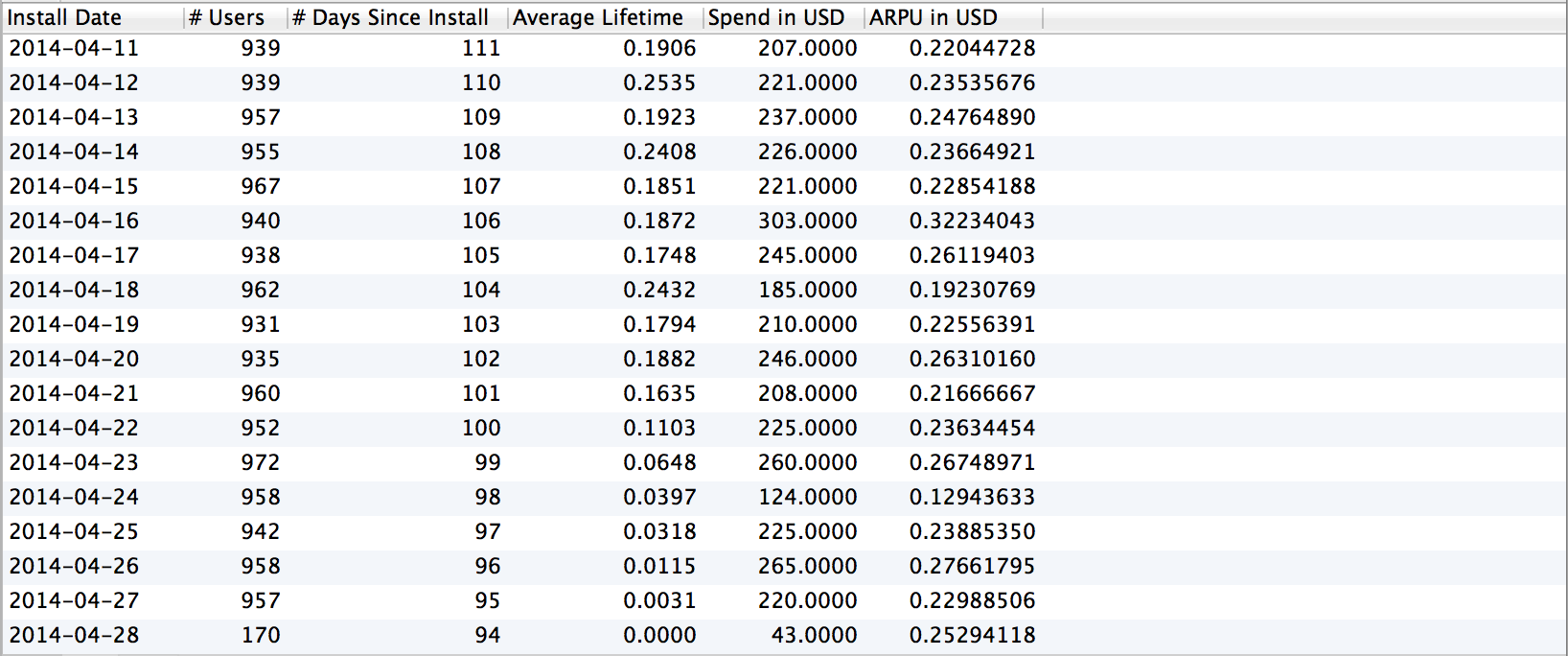
Run channel cohorted query
Another way to look at this data is to group by referrer channel.
- Redshift
- MySQL
SELECT swrve_referrer_id AS referrer,
COUNT(1) AS usercount,
AVG(DATEDIFF(day, date_joined, last_active)) AS average_lifetime,
SUM(spend) / 100 AS spend_usd,
SUM(spend)::float8 / 100 / COUNT(1) AS arpu_usd
FROM swrve_properties
GROUP BY swrve_referrer_id;
SELECT swrve_referrer_id AS referrer,
COUNT(1) AS usercount,
AVG(DATEDIFF(last_active, date_joined)) AS average_lifetime,
SUM(spend) / 100 AS spend_usd,
SUM(spend) / 100 / count(1) AS arpu_usd
FROM swrve_properties
GROUP BY swrve_referrer_id;
This will give you LTV-related metrics by referrer.
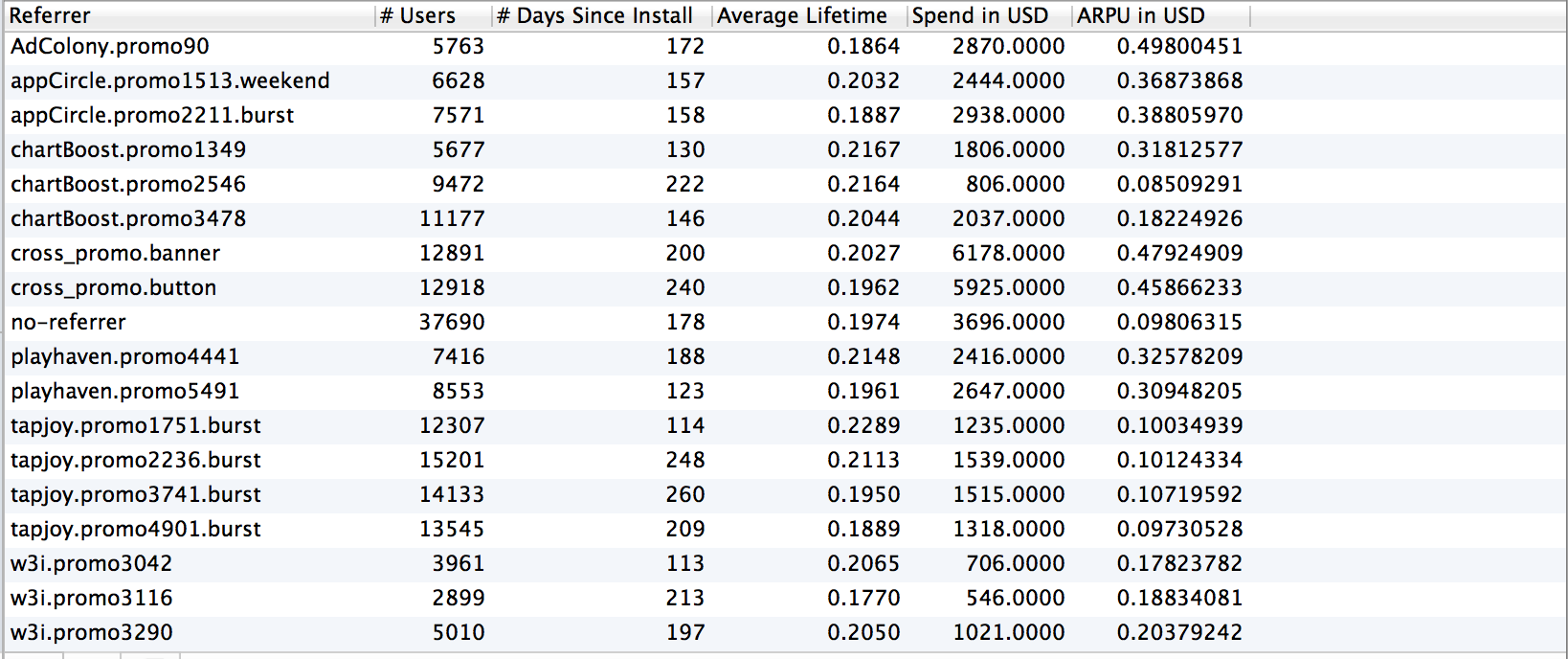 If you want to slice this data further, you can include device information (which is also in the swrve_properties table).
**Need a hosted solution? **Most Swrve customers can self-host this pipeline; all you have to do is follow the steps in these tutorials. However, if you prefer a turn-key hosted solution, we do offer one as a professional service. There is an additional fee associated with this service. For more information, contact your CSM at support@messagegears.com.
**Need help with Queries? **Swrve support can help you with basic setup and configuration of the pipeline described above. If you need help with your queries, contact our Data Services team at support@messagegears.com. They will help you get the most out of your data with dedicated support, pre-built and custom reports, and dedicated data science hours.