How do I capture device type and location?
The Swrve SDK automatically collects the following device attributes on iOS, Android, and Unity. Each attribute is sent as a user property and updated each time they start a new session.
| User attribute name | Description | Example values |
|---|---|---|
| swrve.device_width | The width in pixels of the device screen. | 1125 |
| swrve.device_height | The height in pixels of the device screen. | 2436 |
| swrve.device_dpi | The DPI in pixels of the device screen. | 489 |
| swrve.device_name | The name of the device as reported by the OS. | See Device names section below. |
| swrve.os | The OS the device is running. | iOS, Android |
| swrve.os_version | The version of the OS the device is running. | iPhone OS 16.4, Android OS 14 |
| swrve.app_store | The app store the app was downloaded from. | Apple, Google or Amazon |
| swrve.language | The language of the device. | en-GB (Mapped to English (GB)) |
| swrve.sdk_version | The version of the Swrve SDK being used in the app. | iOS 8.5.0, Android 10.9.1, Unity 9.0.1 |
If you are not using a Swrve SDK on a mobile device, you must send these attributes manually.
Using device info to define user segments
When you create your segments, use the device properties above to identify and target users on a specific device or OS. For example, if you want to target iPhone users only with a messaging campaign or A/B test, use the following filters in the audience or segment builder:
| Data Type | Filter Type | Operator | Value |
|---|---|---|---|
| Device | Device Name | contains | iPhone |
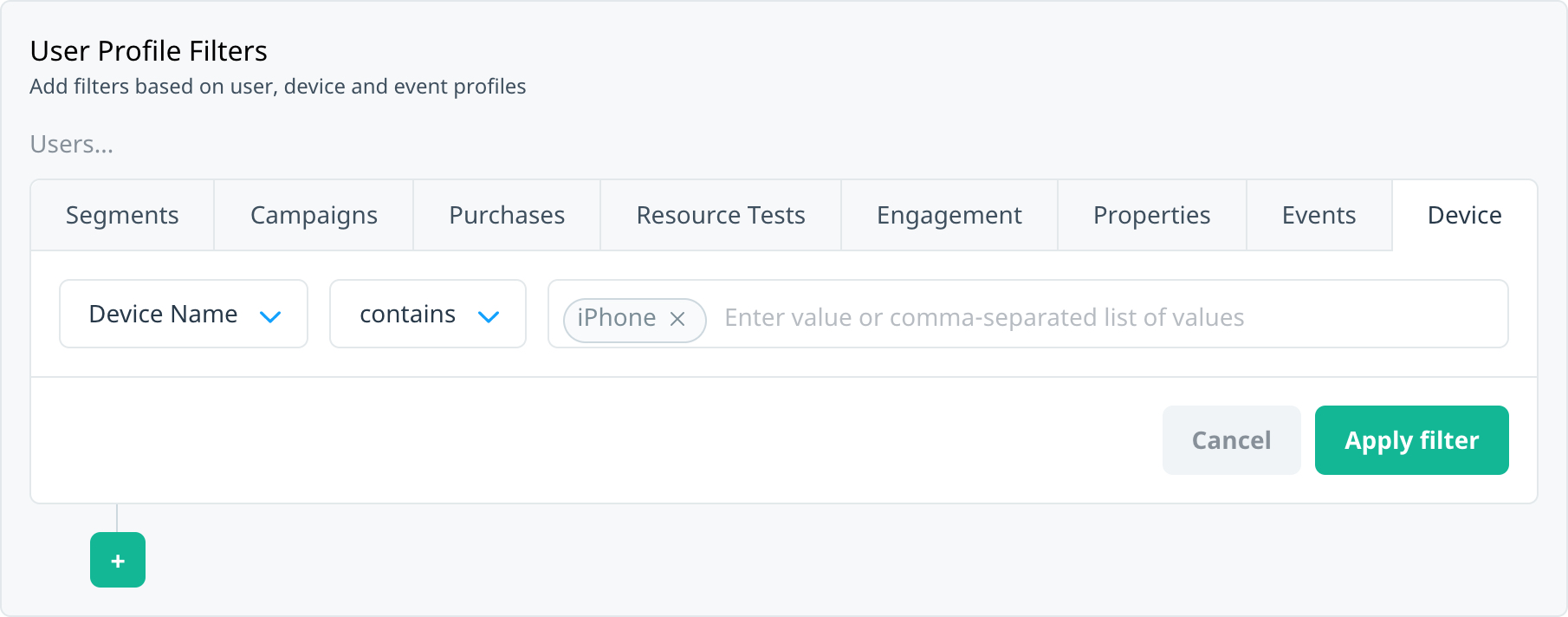 For more information, see Creating segments.
Device names
The device names tracked by Swrve are taken directly from the device.
On iOS, device names are predictable and take the form ,. On Android devices, names are less predictable and depend heavily on the OS to report a coherent name.
Click a link below to view examples of iOS and Android device names:
iOS
| Device name | Description |
|---|---|
| iPhone7,1 | iPhone 6 Plus |
| iPhone7,2 | iPhone 6 |
| iPhone8,1 | iPhone 6s |
| iPhone8,2 | iPhone 6s Plus |
| iPhone8,4 | iPhone SE (1st generation) |
| iPhone9,1; iPhone9,3 | Phone 7 |
| iPhone9,2; iPhone9,4 | iPhone 7 Plus |
| iPhone10,1; iPhone10,4 | iPhone 8 |
| iPhone10,2; iPhone10,5 | iPhone 8 Plus |
| iPhone10,3 | iPhone X |
| iPhone10,6 | iPhone X |
| iPhone11,2 | iPhone XS |
| iPhone11,6 | iPhone XS Max |
| iPhone11,8 | iPhone XR |
| iPhone12,1 | iPhone 11 |
| iPhone12,3 | iPhone 11 Pro |
| iPhone12,5 | iPhone 11 Pro Max |
| iPhone12,8 | iPhone SE (2nd generation) |
| iPhone13,1 | iPhone 12 mini |
| iPhone13,2 | iPhone 12 |
| iPhone13,3 | iPhone 12 Pro |
| iPhone13,4 | iPhone 12 Pro Max |
| iPhone15 | iPhone 13 mini |
| iPhone15 | iPhone 13 |
| iPhone15 | iPhone 13 Pro |
| iPhone15 | iPhone 13 Pro Max |
| iPhone15 | iPhone SE (3rd generation) |
| iPhone16 | iPhone 14 |
| iPhone16 | iPhone 14 Plus |
| iPhone16 | iPhone 14 Pro Max |
| iPad6,11; iPad6,12 | iPad (5th generation) |
| iPad7,5; iPad7,6 | iPad (6th generation) |
| iPad7,11; iPad7,12 | iPad (7th generation) |
| iPad11,6; iPad11,7 | iPad (8th generation) |
| iPad2,4 | iPad 2 (Wi-Fi, revised) |
| iPad5,3; iPad5,4 | iPad Air 2 |
| iPad11,3; iPad11,4 | iPad Air (3rd generation) |
| iPad13,1; iPad13,2 | iPad Air (4th generation) |
| iPad5,1; iPad5,2 | iPad mini 4 |
| iPad11,1; iPad11,2 | iPad mini (5th generation) |
| iPad6,3; iPad6,4 | iPad Pro 9.7-inch |
| iPad7,3; iPad7,4 | iPad Pro 10.5-inch |
| iPad8,1; iPad8,2; iPad8,3; iPad8,4 | iPad Pro 11-inch (1st generation) |
| iPad8,9; iPad8,10 | iPad Pro 11-inch (2nd generation) |
| iPad13,4; iPad13,5; iPad13,6; iPad13,7 | iPad Pro 11-inch (3rd generation) |
| iPad6,7; iPad6,8 | iPad Pro 12.9-inch (1st generation) |
| iPad7,1; iPad7,2 | iPad Pro 12.9-inch (2nd generation) |
| iPad8,5; iPad8,6; iPad8,7; iPad8,8 | iPad Pro 12.9-inch (3rd generation) |
| iPad13 | iPad Pro 12.9-inch (4th generation) |
| iPad15 | iPad Pro 12.9-inch (5th generation) |
| iPad16 | iPad Pro 12.9-inch (6th generation) |
| iPod1,1 | iPod touch |
| iPod2,1 | iPod touch (2nd generation) |
| iPod3,1 | iPod touch (3rd generation) |
| iPod4,1 | iPod touch (4th generation) |
| iPod5,1 | iPod touch (5th generation) |
| iPod7,1 | iPod touch (6th generation) |
| iPod9,1 | iPod touch (7th generation) |
Android
| Retail Branding | Marketing Name | Model |
|---|---|---|
| Samsung | Galaxy S21 5G | SM-G9910 |
| Samsung | Galaxy S21 Ultra | SM-G9980 |
| Samsung | Galaxy Note 20 Ultra 5G | SM-N986B |
| Motorola | Moto G Power (2021) | XT2041DL |
| OnePlus | OnePlus 9 Pro | LE2120 |
| Pixel 4a 5G | GD1YQ | |
| Pixel 5 | GD1YQ | |
| Huawei | P40 Pro | ELS-NX9 |
For a list of devices supported for use with Google Play, click here.